Hi, I’m Kyara - a UX designer who also tinkers with hardware. Prev. @Google Cloud

p.s. all doodles are hand-drawn

Illustrated portrait of Kyara Lora

Projects

About

I've always been a builder.

I started in middle school and haven't really stopped. I've built PCs, keyboards, and iPods, fixed up a dryer, and I still play around with microcontroller boards (hi Arduino!). Along the way, I learned how frustrating it is when something doesn't work the way you want it to, and how good it feels when it finally does. I bring that same mindset to my designs because I want things to ‘just work’ for the people using them.

I recently finished my time as a UX Designer at Google, where I worked on Google Cloud (Cloud SQL + Database Center) and Google Classroom. I did research with users, including database administrators (DBAs), teachers, and students, and designed some pretty cool things in the process. My philosophy is that even complex systems should feel effortless to use, and I like turning technical constraints into experiences that feel intentional and work well.

TL;DR

RecentlyUX Designer, Google Cloud + Classroom
FocusComplex technical tools, for DBAs, teachers, and students
Also builds/fixesPCs, keyboards, iPods, and now, dryers!
Sticker: three cats, one black, one gray and one tabby, lounging on a cat tree Sticker: Kyara posing beside a giant Blastoise statue Sticker: a modded iPod Classic in a clear yellow shell, playing “Cupid” by 112 Sticker: “Kyara was here” handwritten in pink marker, with a heart

Kind notes from the field

A note from

Chris Norman

Senior Staff UX Manager for GenAI Creatives at YouTube Ads, my mentor

It’s a pleasure to recommend Kyara, a designer who effortlessly bridges deep technical rigor and human-centered intuition.

Across everything from complex enterprise cloud infrastructure to thoughtful, accessible micro-interactions, she brings an instinct for turning dense technical constraints into intuitive workflows. Watching her thoughtfully integrate generative AI workflows and techniques into every stage of product development has been a genuine highlight; as a mentor, there is nothing better than learning right alongside your mentee.

What truly sets Kyara apart is her collaborative spirit. She dives headfirst into ambiguity, eagerly partnering with cross-functional teams to untangle gnarly problems and shape them into seamless, high-impact experiences. Her builder’s mindset and infectious enthusiasm make her an invaluable asset to any team ready to elevate how users interact with complex digital ecosystems without losing the unique personality that sets those experiences apart.

A note from

Rey Benoit

Product Design Lead at Google Cloud, my manager

Kyara is an exceptionally talented UX designer whose craft, technical curiosity, and leadership far exceed expectations.

What sets Kyara apart is her fearlessness in tackling highly complex problem spaces. From taking full ownership of generative research and usability synthesis in unfamiliar domains to architecting ML-driven UX features and responsible AI workflows, she consistently delivers senior-level results. She pairs a proactive, hacker-like problem-solving approach with genuine cross-functional leadership, frequently conquering new challenges well ahead of timeline milestones.

Kyara is a rare talent who bridges the gap between deep technical systems and human-centered design. She will make an immediate, outsized impact on any product design team lucky enough to have her.

A note from

Jamal Momon

Senior UX Researcher at Google for Education, my mentor

From helping out with Teacher camp and Teen Tech Time on multiple occasions,

Kyara has always sought the opportunity to help out and has always been such a natural with our users! Stay positive, stay proactive, and stay eager. The world is ready for you!

A note from

Vaishali Jain

Staff UX Designer at Waymo, my interim manager

A true master of blending AI capability with sharp intuition.

Through her work, Kyara showed us all how to turn raw AI outputs into reliable, high-impact products. We’ll miss your sharp eye and technical brilliance!

A note from

Cinthya Mohr

Director of UX at Google for Education

Kyara integrated seamlessly and made a tremendous impact from start to finish.

Her contributions, from thorough notetaking to confidently leading user conversations, were invaluable. She demonstrated incredible poise and professionalism, truly feeling like an essential part of the team. She set such a high standard of excellence and made a lasting impression! Thank you, Kyara, for keeping our educators engaged, supported, and heard!!

Kyara Lora

UX / Product Designer

Summary

UX/Product Designer with 2+ years of experience designing enterprise, AI, and education products across Google Cloud Platform and Google Classroom. Translates ambiguous technical problems into intuitive, scalable experiences through user research, rapid prototyping, accessibility-first design, and close partnership with product and engineering teams.

Experience

BeReal Product Management & Design Extern, Remote

Sep 2026 to Present

Facilitated via the Extern platform

  • Designed and prototyped high-fidelity BeReal concepts in Figma, translating growth-strategy ideas into testable product directions for stakeholder and user review.
  • Shaped roadmap decisions from 9 participants by facilitating focus groups and structured surveys, then translating usability findings into prioritized UX recommendations.
  • Built a leadership-ready rollout proposal by combining user research, competitive benchmarking, and go-to-market planning into one clear product recommendation.

Google UX Design Apprentice, New York, NY

Feb 2025 to Aug 2026

Google Cloud Databases

  • Established reasoning and transparency UX patterns for Gemini Cloud Assist, driving partner-team adoption and contributing to a featured Google Cloud Next ’26 Developer Keynote demo.
  • Supported an estimated $8.32M Oracle-to-GCE migration launch by evaluating setup flows with RITE research, delivering UX recommendations that unblocked product readiness.Case study: Charting the Migration
  • Enabled fleet-wide triage for Database Center by designing an end-to-end issue-dismissal flow that bridged workflow gaps between legacy and modern APIs.Case study: Silence the Noise
  • Influenced 20% of Cloud SQL’s next-quarter engineering roadmap by auditing key workflows and surfacing high-impact usability and pricing friction.
  • Addressed a <1% resolution rate across 364K+ critical alerts by redesigning Cloud SQL recommendations to surface contextual, actionable fixes inside users’ active workflows.Case study: From Ambiguity to Action
  • Delivered a fully scoped, engineering-ready design within 4 weeks by partnering with PM and engineering to align on user-centered trade-offs and unblock development.

Google Classroom

  • Expanded discovery of revenue-generating P0 AI tools across 11+ Classroom teams by designing responsive onboarding components aligned with WCAG and Google Material 3.Case study: Just Enough Help
  • Guided iteration of a generative AI assistant using feedback from 30+ educators, producing a risk-mitigation report focused on student AI over-reliance.
  • Supported a +2.76% lift in monthly active users and a 91.2% ease-of-use score by testing homepage hierarchy, feature prioritization, and discoverability through structured usability testing.

Education & certifications

  • Bachelor of Arts in English Literature, Education, & Korean LanguageUniversity at Albany, SUNY
  • Certificate of Completion of Registered Apprenticeship, UX DesignU.S. Department of Labor & Google
  • Google UX Design Professional CertificationCoursera
  • Google AI Essentials CertificationCoursera
  • CompTIA A+ CertificationCompTIA

Skills

Technical & Tools
Figma, Framer, Webflow, Adobe Creative Suite, Blender, GitHub, VS Code
Languages & Libraries
Python, JavaScript, SQL, HTML/CSS, React, Next.js, Angular, Node.js
UX Design & Research
High- & Low-fidelity Prototyping, Design Systems, Design-Dev Handoff, A/B Testing, User Interviews, Usability Testing, Data Synthesis, Cross-functional Collaboration
Accessibility
WCAG Guidelines, APCA Contrast Guidelines
AI
Gemini, AI Studio, Antigravity, Figma Make, ChatGPT, Codex, Claude Code, NotebookLM, Lovable
All work

Silence the Noise.

TimelineDec ’25 to Jan ’26

Restoring control to users by paying down experience debt and designing a dismissal workflow for Google Cloud’s Database Center.

Projected outcome: bridge the dismissal gap between two live systems.

At a glance

Role
UX Designer
Platform
Google Cloud Platform (Web)
Team
1 PM, 1 UXR, 3 Engineers
Focus
B2B SaaS, Enterprise Design

The brief

Problem

A fractured backend architecture left database administrators (DBAs) unable to dismiss modern alerts, creating alert fatigue and causing critical health signals to get buried.

Solution

A unified dismissal framework featuring organization-level scoping, bulk actions, and flexible snoozing directly within the user’s natural workflow.

Outcome

Unblocked the retirement of a legacy system

Handed off to engineering

Context

When you can’t silence the noise, staying focused becomes a second job.

Imagine waking up to hundreds of notifications. You try to clear them, but half won’t swipe away, so the ones that matter get buried in the clutter.

For a database administrator (DBA) managing a massive enterprise fleet, missing one critical health signal can cause a total production outage. In Google Cloud’s Database Center, DBAs were dealing with a constant fog of non-critical alerts.

“When a recommendation comes in, I want the ability to simply dismiss it. I may know the issue exists, but I don’t want to fix it right now. I need it to go away until I’m ready to come back to it.”

GCP Enterprise User

The root of the problem was in the backend. Database Center pulled data from two separate systems:

  • The legacy Active Assist API let users dismiss issues.
  • The modern Database Center (DBC) API did not.

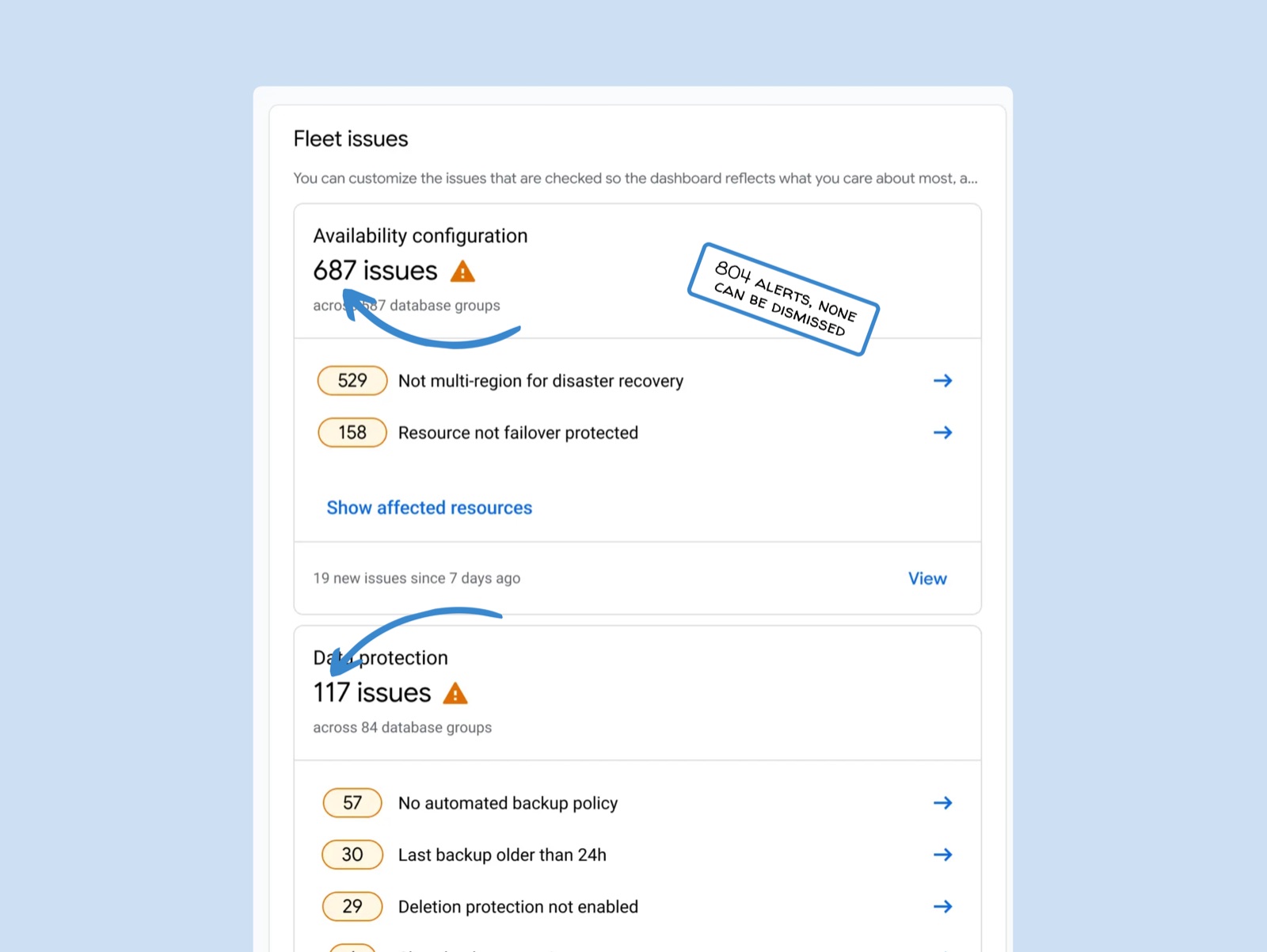
To users, this technical difference was invisible. They just saw a dashboard where dismissing worked on some issues and failed on others. With no way to clear the clutter, critical issues slowly got drowned out.

I was asked to design a dismissal experience that would put users back in control of their noisy workspaces.

Database Center’s fleet issues view with 687 availability issues and 117 data protection issues, annotated: 804 alerts, none can be dismissed

Alignment

We tied dismissal to the broader engineering roadmap, which got everyone aligned.

Success Criteria
Implement dismissal logic in Database Center to help centralize triage for all GCP workloads.

This project was part of a larger, ongoing initiative called “Issues for All” (I4A). I4A aims to bring fragmented alerts across all 9 of Google Cloud’s core database engines, plus the Oracle and Google Cloud partnership, into one experience under Database Center.

The plan was to retire Active Assist and move all issue triage into Database Center. The problem was that the Database Center API had no way to dismiss an issue, so when Active Assist went away, users would lose dismissal altogether.

Framing the problem this way got UX, PM, and Engineering aligned right away: without dismissal, I4A couldn’t move forward.

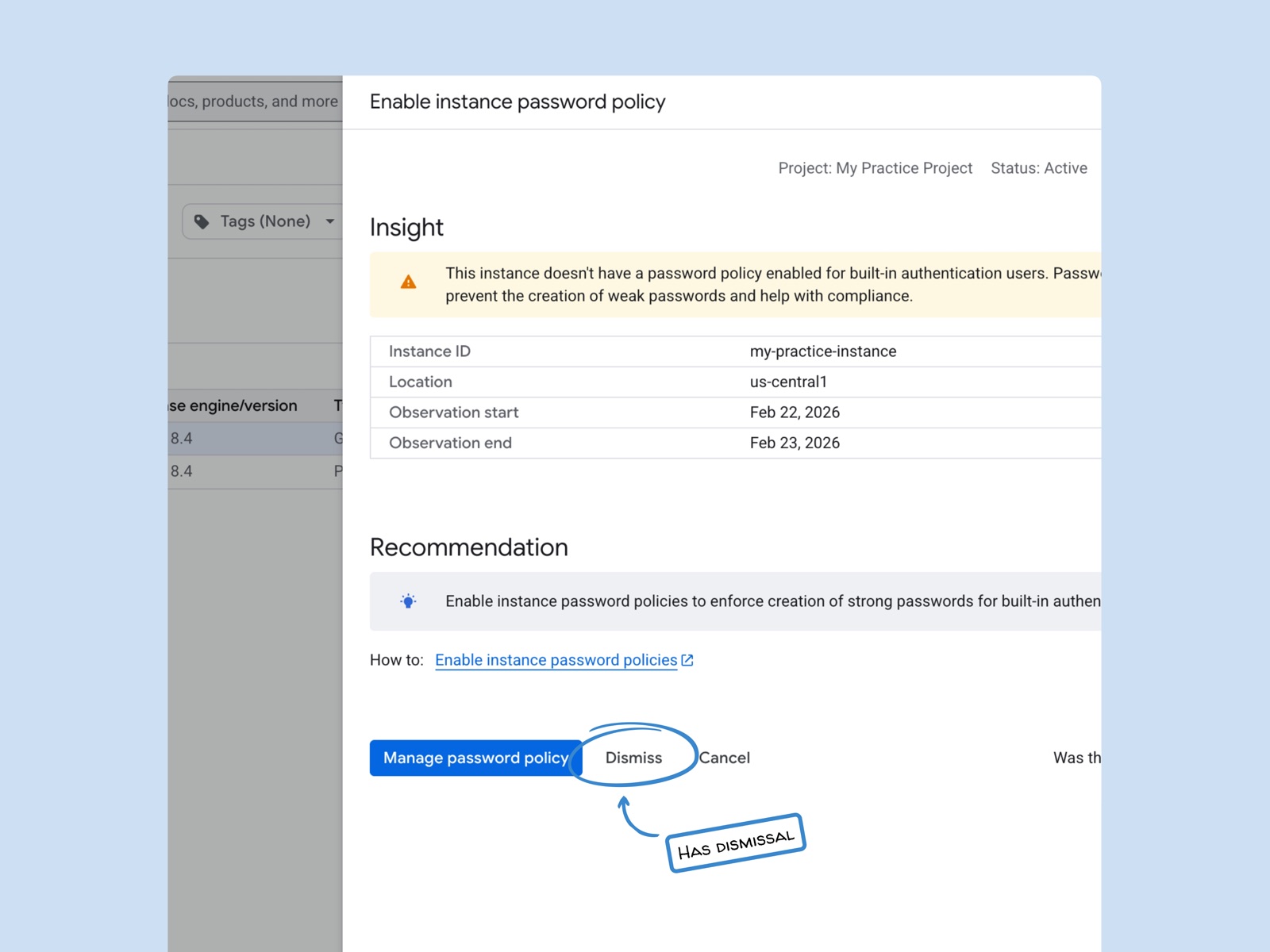
Legacy system (Active Assist)Supported dismissal.
An Active Assist recommendation panel with Manage password policy, Dismiss and Cancel buttons, annotated: has dismissal
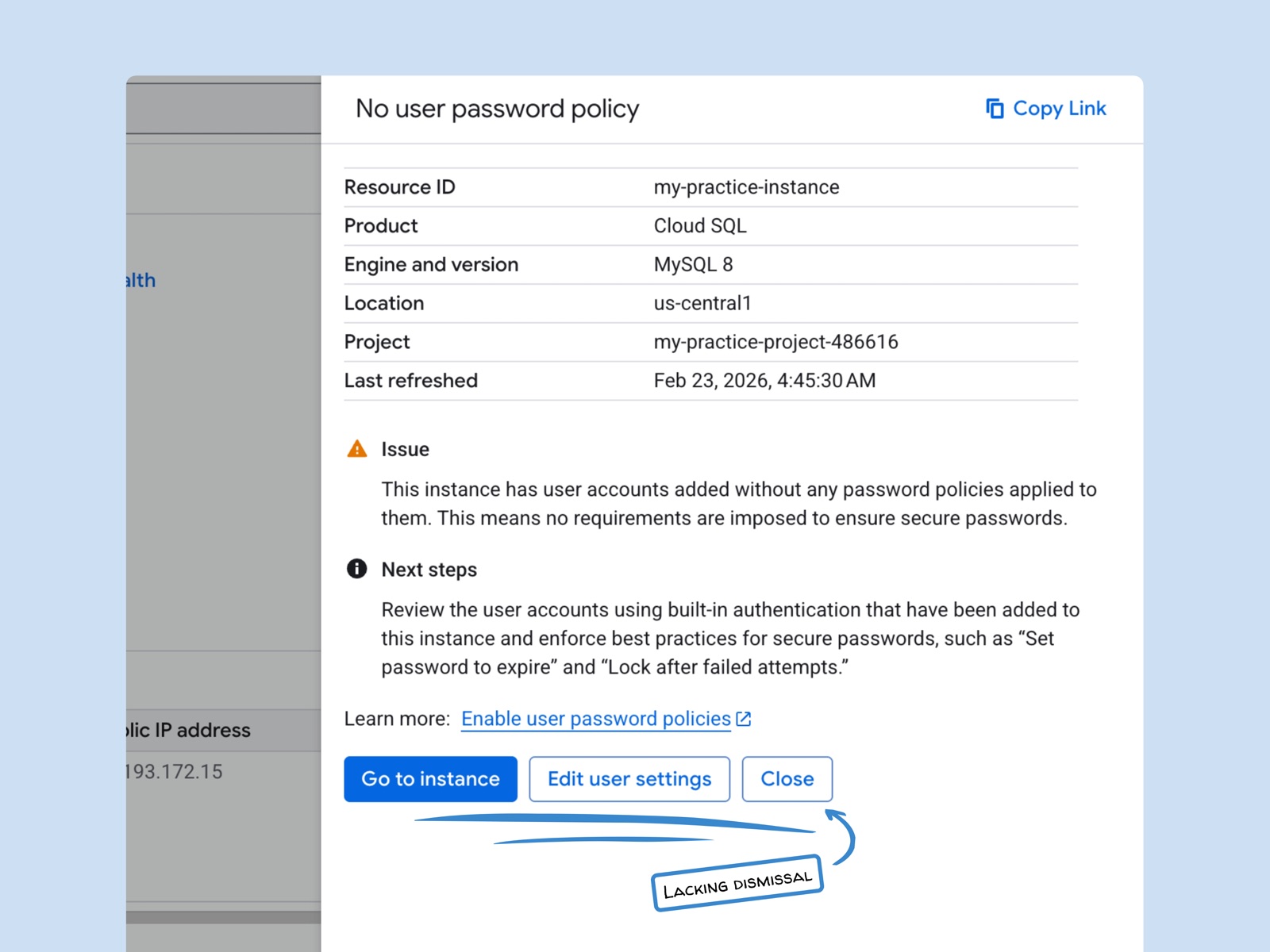
Modern system (Database Center)Did not support dismissal.
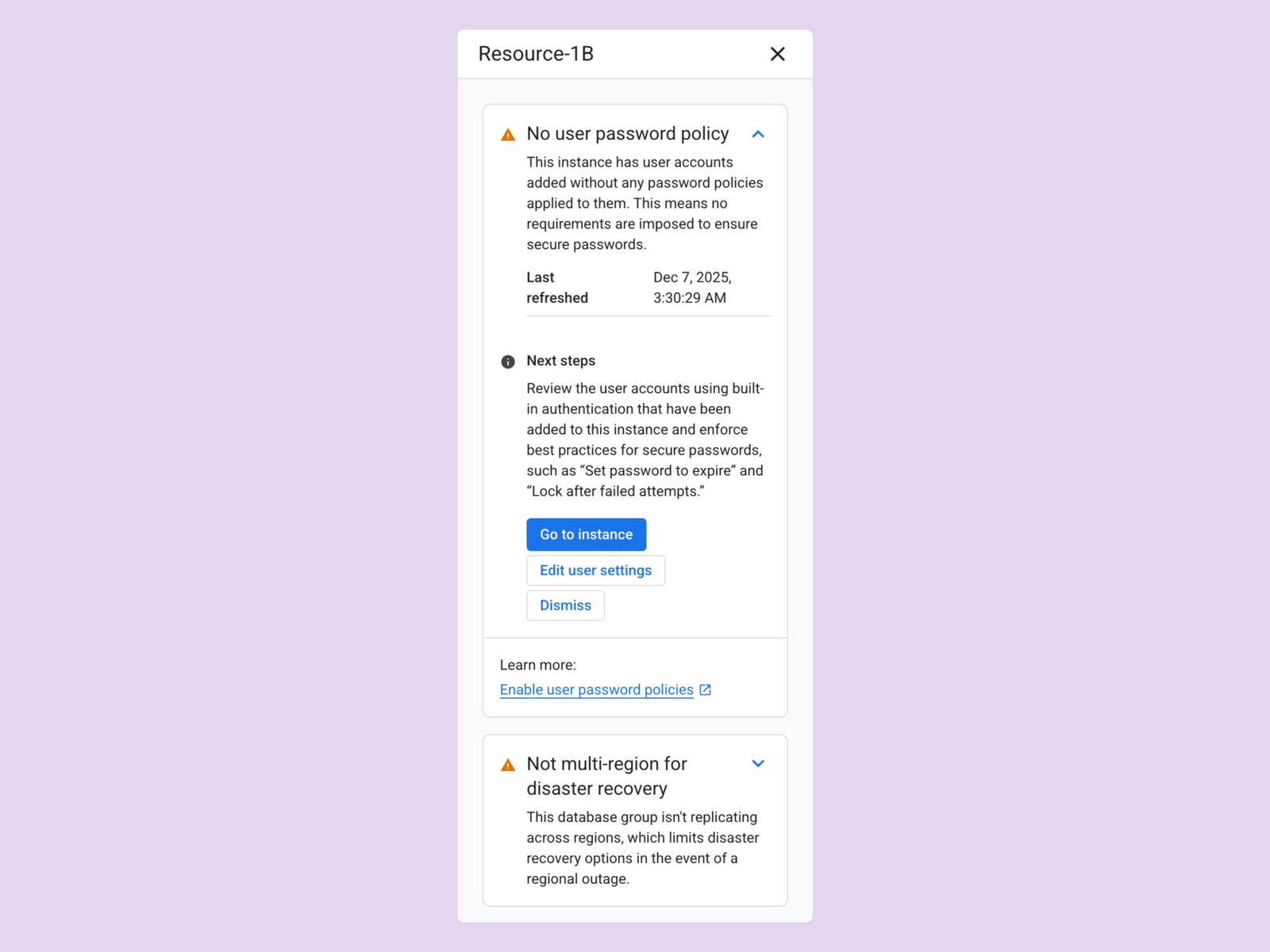
A Database Center issue panel with Go to instance, Edit user settings and Close buttons but no Dismiss, annotated: lacking dismissal

Constraints & Scale

Designing a “Dismiss” button is easy. Designing for massive enterprise fleets is more involved.

The legacy system made dismissal tedious and rigid. DBAs had to clear alerts one by one, and anything they dismissed stayed hidden until they restored them manually. Our research showed they wanted more control, so I built the flow around four needs:

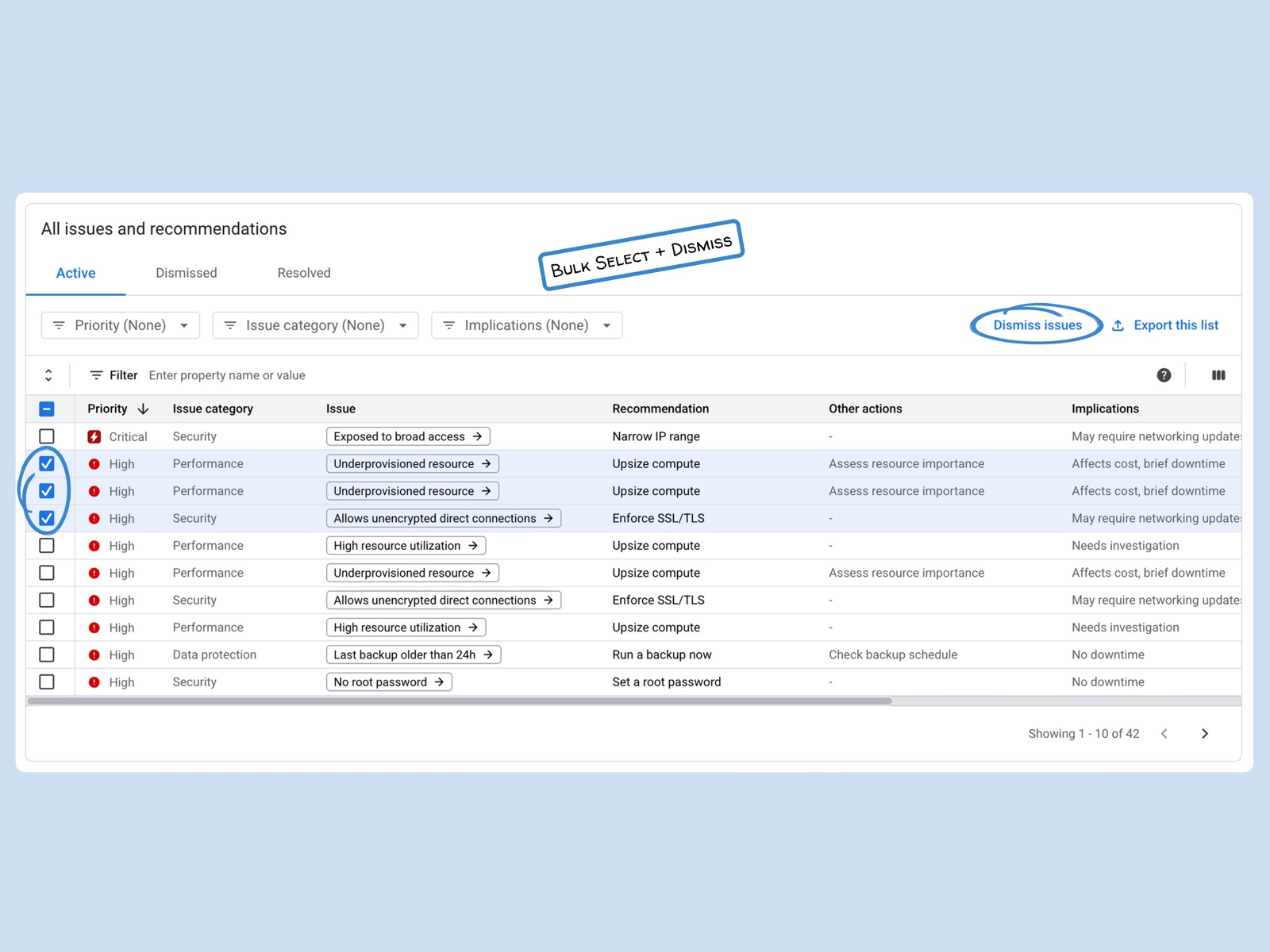
First, bulk action

Making a DBA dismiss hundreds of notifications one at a time is a non-starter. I designed a flow that lets users select multiple alerts and clear them together.

The All issues and recommendations table with three issues checked and a Dismiss issues button, annotated: bulk select and dismiss

Second, organizational scope

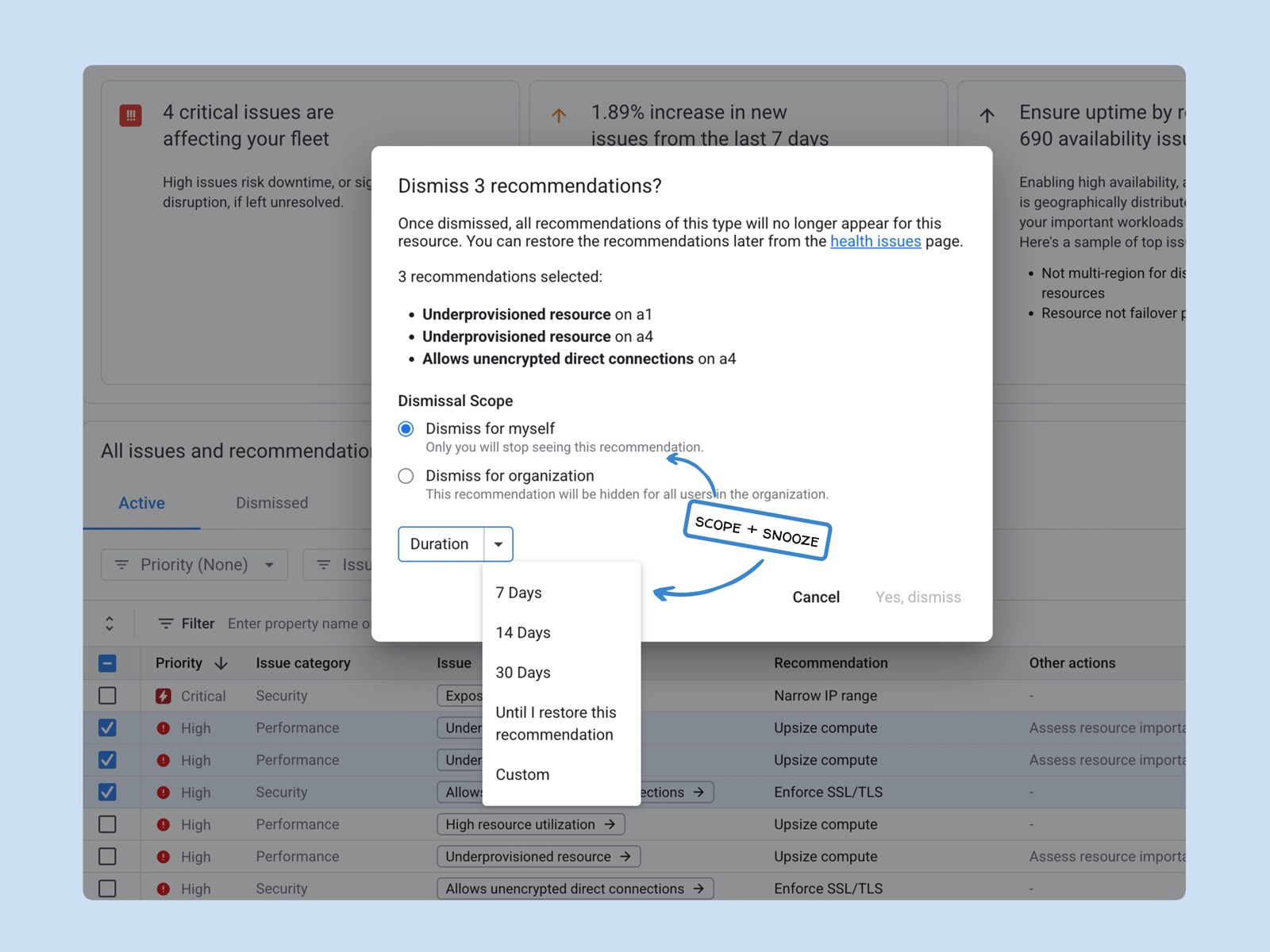
At enterprise scale, an alert that’s noise to one person can be urgent for someone else. Letting users choose who a dismissal applies to keeps teams from hiding a critical issue by accident. I added a confirmation step where users pick between “Dismiss for myself” and “Dismiss for organization.”

  • Dismiss for organization is permissions-based, so a DBA manager can clear noise for the whole team and save everyone time.
  • Dismiss for myself lets an individual contributor silence an out-of-scope alert without hiding it from a teammate.
The Dismiss 3 recommendations dialog, choosing Dismiss for myself or for organization, with a duration from 7 days to until restored

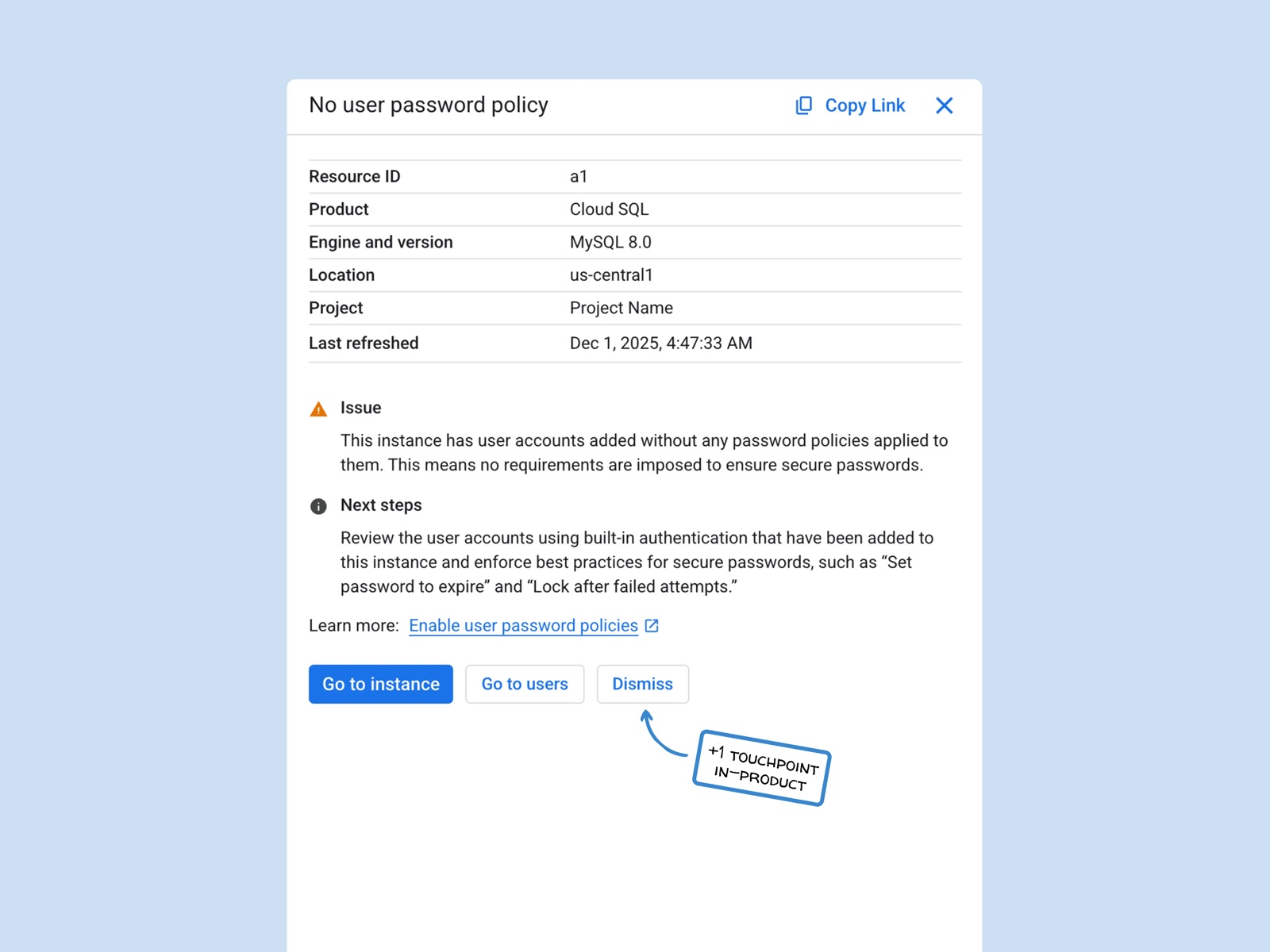
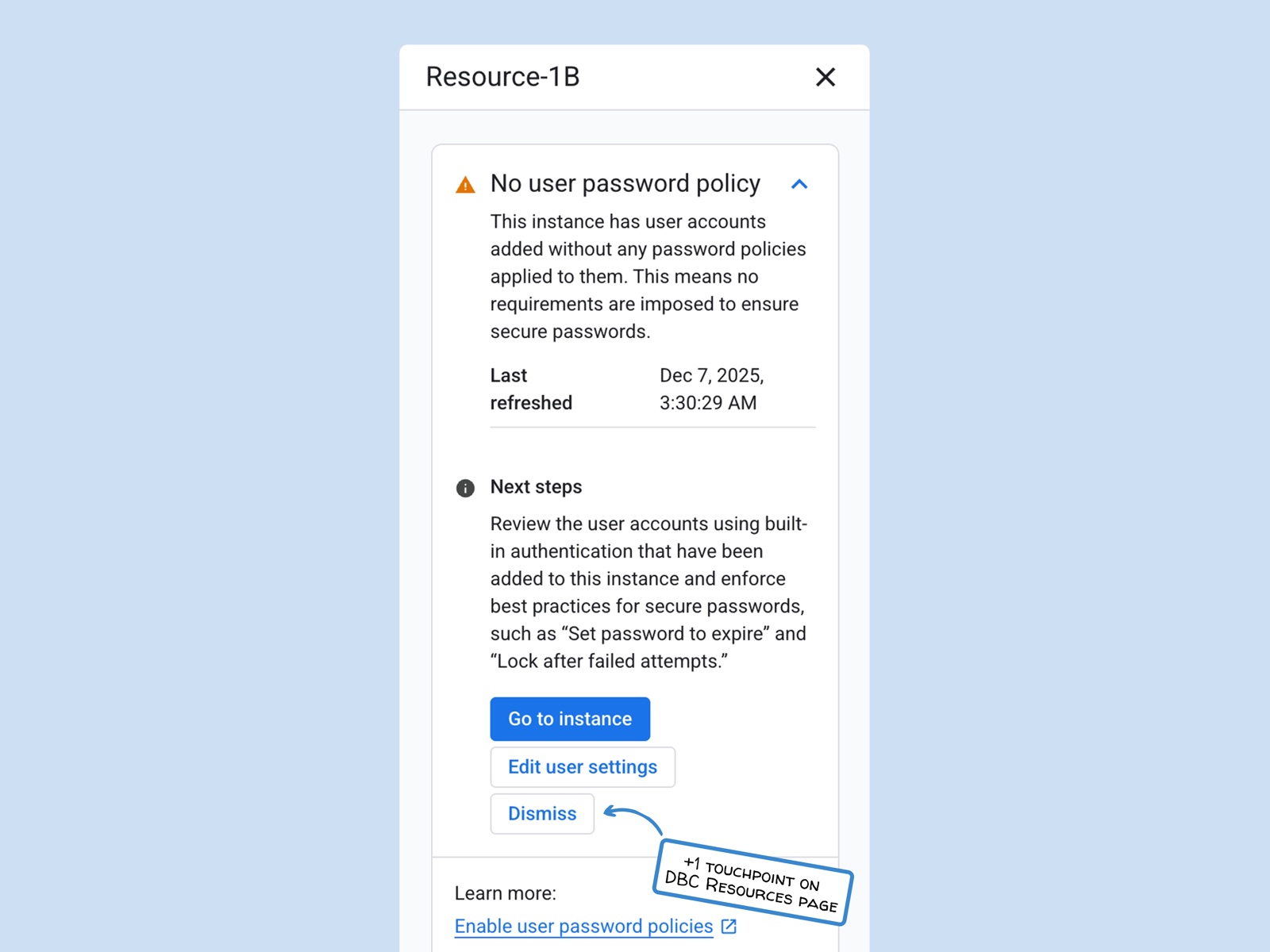
Third, in-product touchpoints

Past research showed users are 5x more likely to dismiss issues directly from product pages like Cloud SQL, or from Database Center’s Resource page. I added dismissal to both, so users don’t have to leave what they’re doing to clean up their workspace.

Product page (Cloud SQL)Dismissal added in-product.
A Cloud SQL issue panel with a new Dismiss button beside Go to instance, annotated: plus one touchpoint in-product
Database Center (Resource page)Dismissal added on the Resource page.
A Database Center resource panel with a new Dismiss button under Edit user settings, annotated: plus one touchpoint on the Resources page

Fourth, flexibility

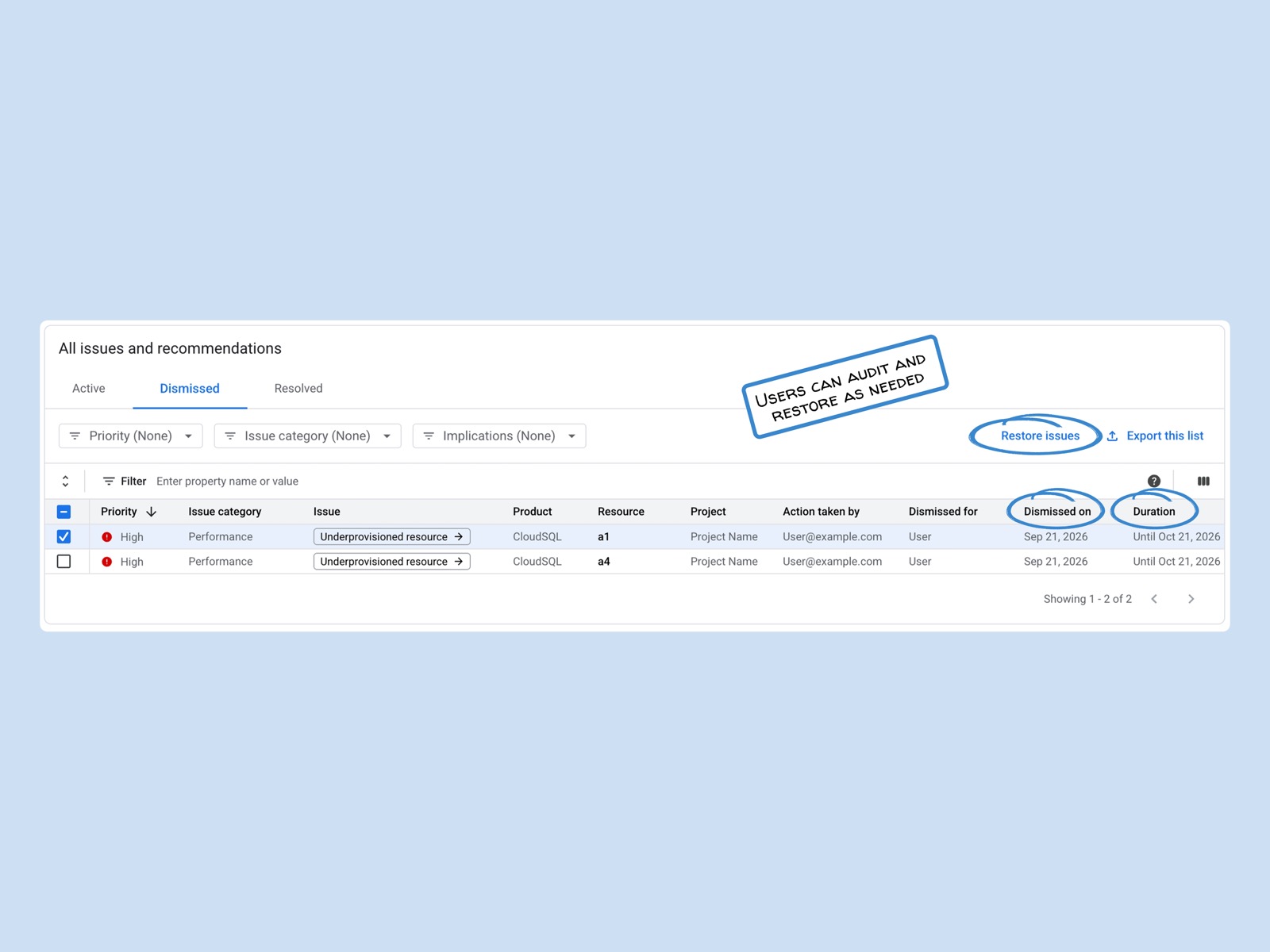
Some users only needed to quiet their dashboard until a scheduled maintenance window, so I introduced a “Snooze” option. In the dismissal modal, users can pick 7, 14, or 30 days, enter a custom date, or choose “Until I restore the recommendation.” This lets DBAs match their workspace to their actual schedules. For peace of mind, I also added a “Dismissed” archive where they can audit past decisions or restore alerts.

The Dismissed tab listing each dismissed issue with who dismissed it, when and for how long, and a Restore issues button

Solution

Examining the full end-to-end flow.

Below is the full solution handed off to engineering. It follows this user journey:

  1. Dismiss issue in Cloud SQL
  2. Dismiss issue in DBC Resources
  3. View dismissed issues in
    DBC Health Issues page
  4. Bulk dismiss
  5. Recover issue
  6. Granular filtering

Exploration & AI

I prototyped an AI agent that could make Gemini Cloud Assist a partner that takes action.

Even with bulk actions and smart scoping, managing thousands of alerts by hand is still a chore. I wanted to see what this workflow could look like if AI did the heavy lifting.

Outside the project’s scope, I:

  • Mapped out the logic in Antigravity
  • Tested prompts through the Gemini CLI
  • Built a speculative agent prototype in AI Studio

In the prototype, the agent scans a database fleet, looks for patterns, and recommends safe dismissals based on tags and upcoming maintenance windows. It was speculative, but it got people talking about Gemini Cloud Assist actually taking action instead of just surfacing information.

Outcome & Reflection

I turned the dashboard from a daily frustration into a high-signal workspace.

  • Handed offto engineering
  • Unblockedthe retirement of a legacy system
  • 2 into 1backend APIs unified behind one dismissal model

This project was ultimately an exercise in paying down experience debt. The final framework gives enterprise users a consistent way to manage their alerts, something Google Cloud’s database products had been missing for a long time. It also removes one of the main blockers to retiring Active Assist and moving Database Center forward.

What I learned: The biggest thing I learned was how even a small action like dismissal depends on the system behind it. Understanding the backend roadmap is what turned a missing button into a problem the whole team agreed to solve.

What my PM said

“Kyara has been amazing to work with. She picked-up a complex and important feature - “Issue Dismissibility” and really ensured a simple/intuitive user experience while also complying with Eng feasibility. She acted as a true team player.”

Apoorv S., Product Manager, Google Cloud Platform
All work
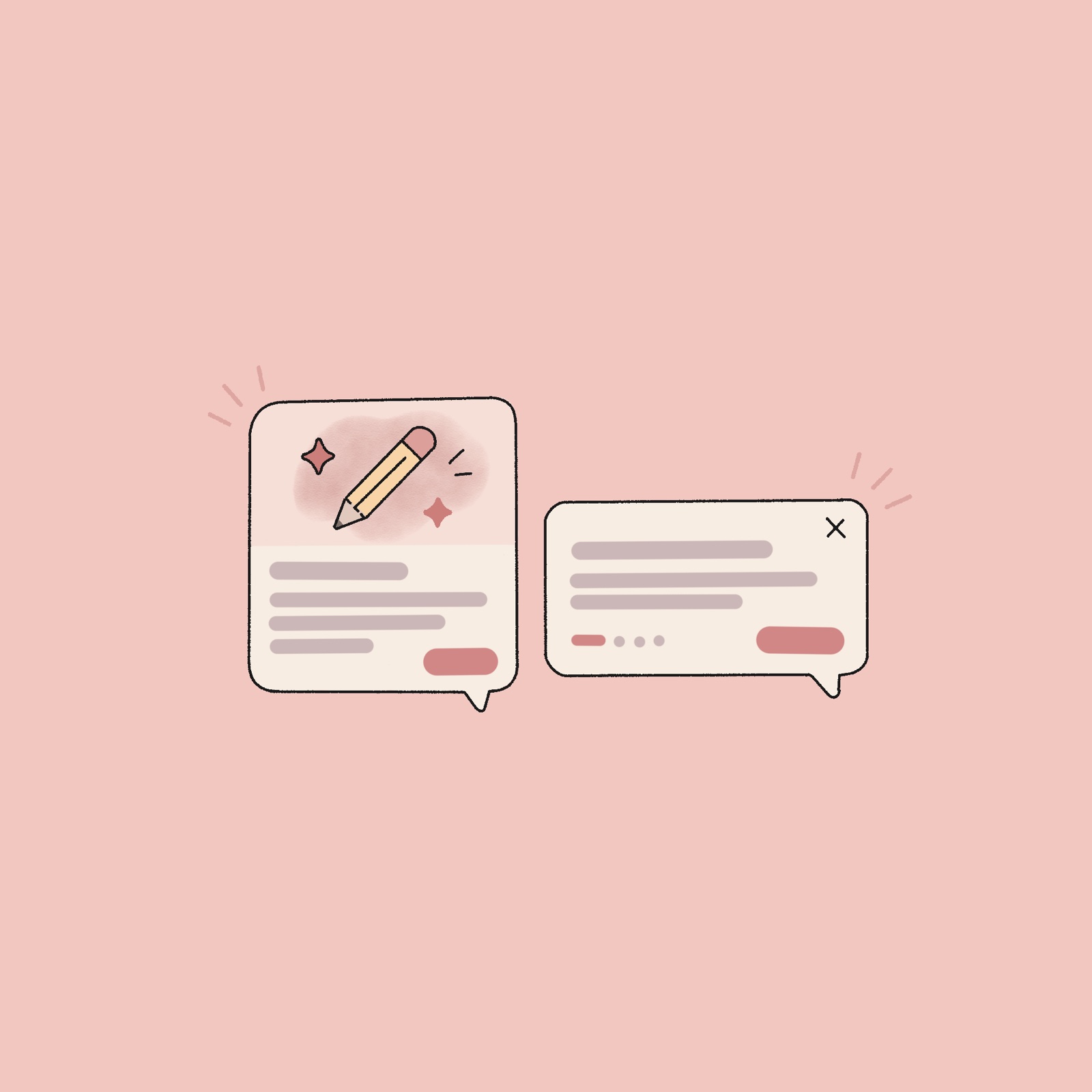
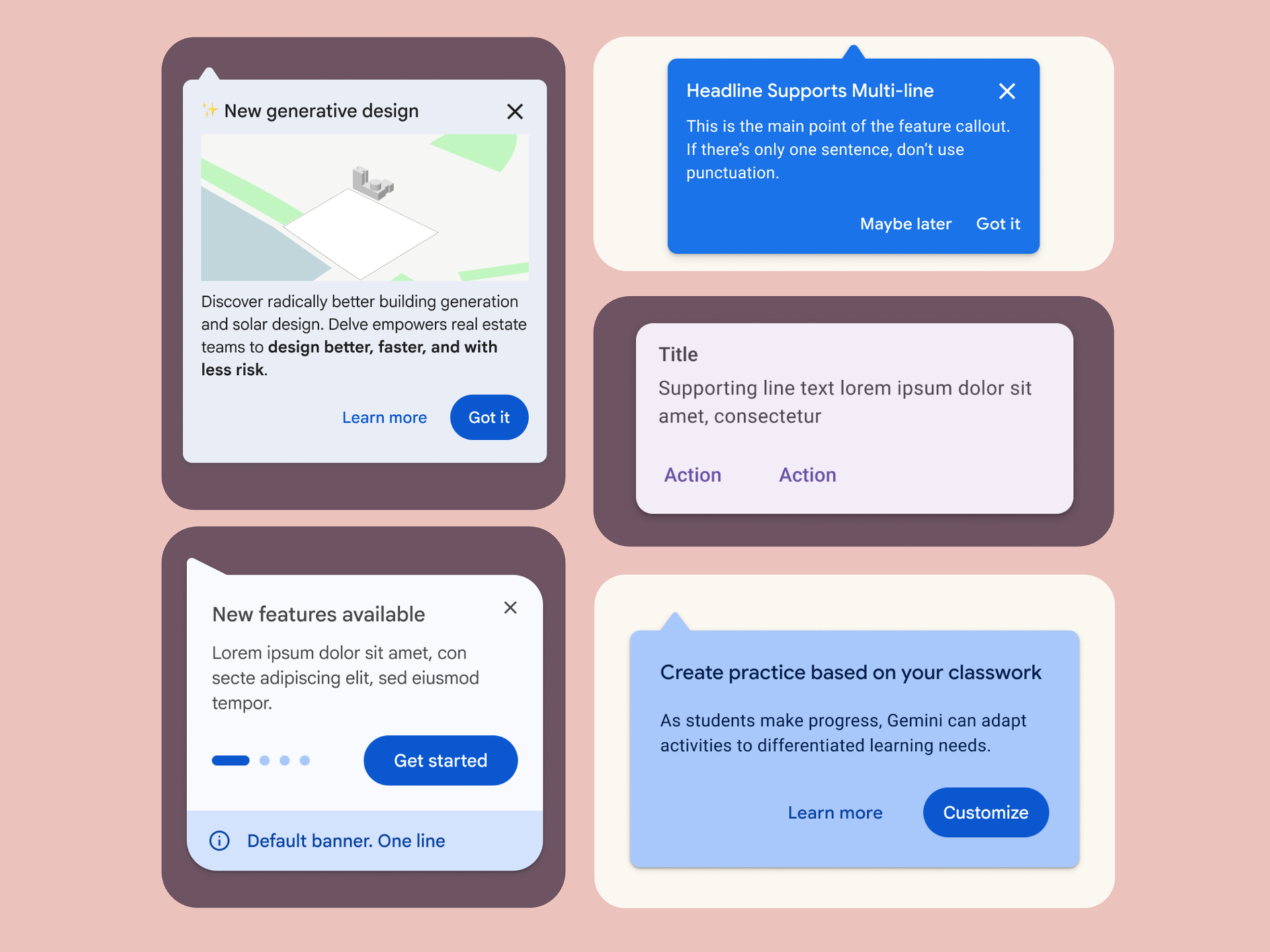
Illustration of two contextual tooltips: one with a pencil-and-sparkles image above its text, one with text only and a close button

Just Enough Help.

TimelineMay to July 2026

Google Classroom was launching new paid AI features, but its old onboarding component wasn’t helping discovery. I designed its replacement: a Contextual Tooltip to succeed where the deprecated version failed.

11+ team adoption commitments. 100% A11Y sign-off.

At a glance

Role
UX Designer
Platform
Google Classroom (Web & Mobile)
Team
1 PM, 1 UX Mentor, 1 UX Manager, 3 Engineers
Focus
Design Systems & Accessibility

The brief

Problem

Classroom’s old onboarding tool, Guided Help, was a full-screen pop-up that had failed an accessibility audit. Once it was retired, teams had no real way to introduce new features, including Classroom’s new paid AI tools.

Solution

A Contextual Tooltip built on Google Material 3 (GM3), with rules for how teams use it and accessibility annotations for engineering.

What I Owned

Component design, web and mobile accessibility annotations, system governance guidelines, and engineering handoff.

Outcome

11+ feature teams committed to adopting the component.

100% GAR 4 accessibility compliance.

Backdrop

Users weren’t finding Google Classroom’s new paid AI features, even though they’d been highly requested.

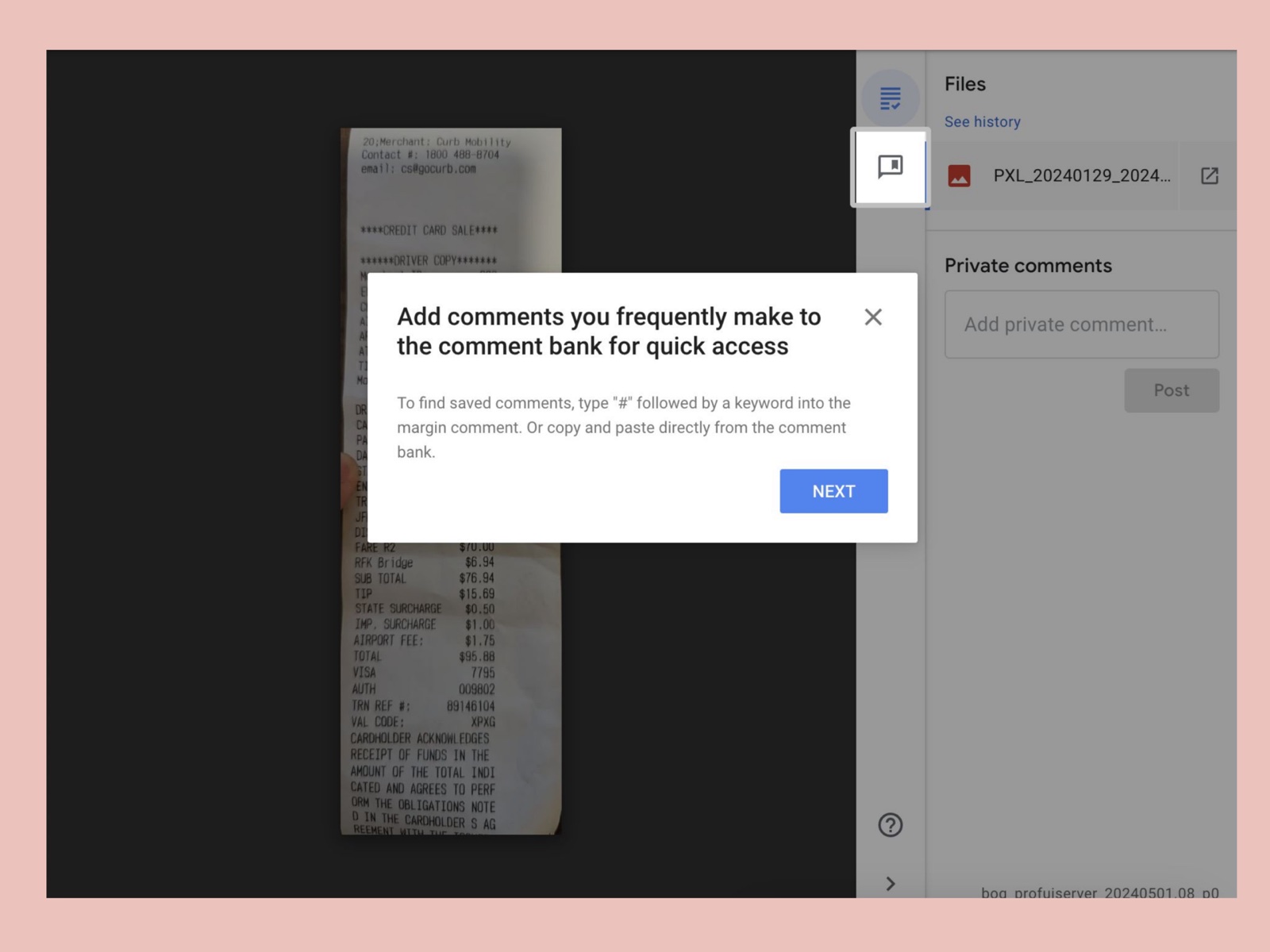
Guided Help, the old onboarding tool, was supposed to fix this by introducing features as they launched, but it was part of the problem. It was a full-screen modal that interrupted teachers and students while they were working, so most closed it right away:

  • 50%of users closed it within 4.5 seconds
  • 75%of users closed it within 7.5 seconds
  • 90%of users closed it within 15 seconds

It had also failed a Google Accessibility Requirements (GAR 4) audit because of critical screen reader and keyboard navigation issues, meaning that, for anyone relying on assistive technology, it didn’t work.

When Guided Help was deprecated, we had no scalable way to introduce new features. So, I needed to design a component that informed users clearly without disrupting them.

Guided Help, the old full-screen onboarding modal, covering a student’s work in Google Classroom with a tip about the comment bank

Strategy & Alignment

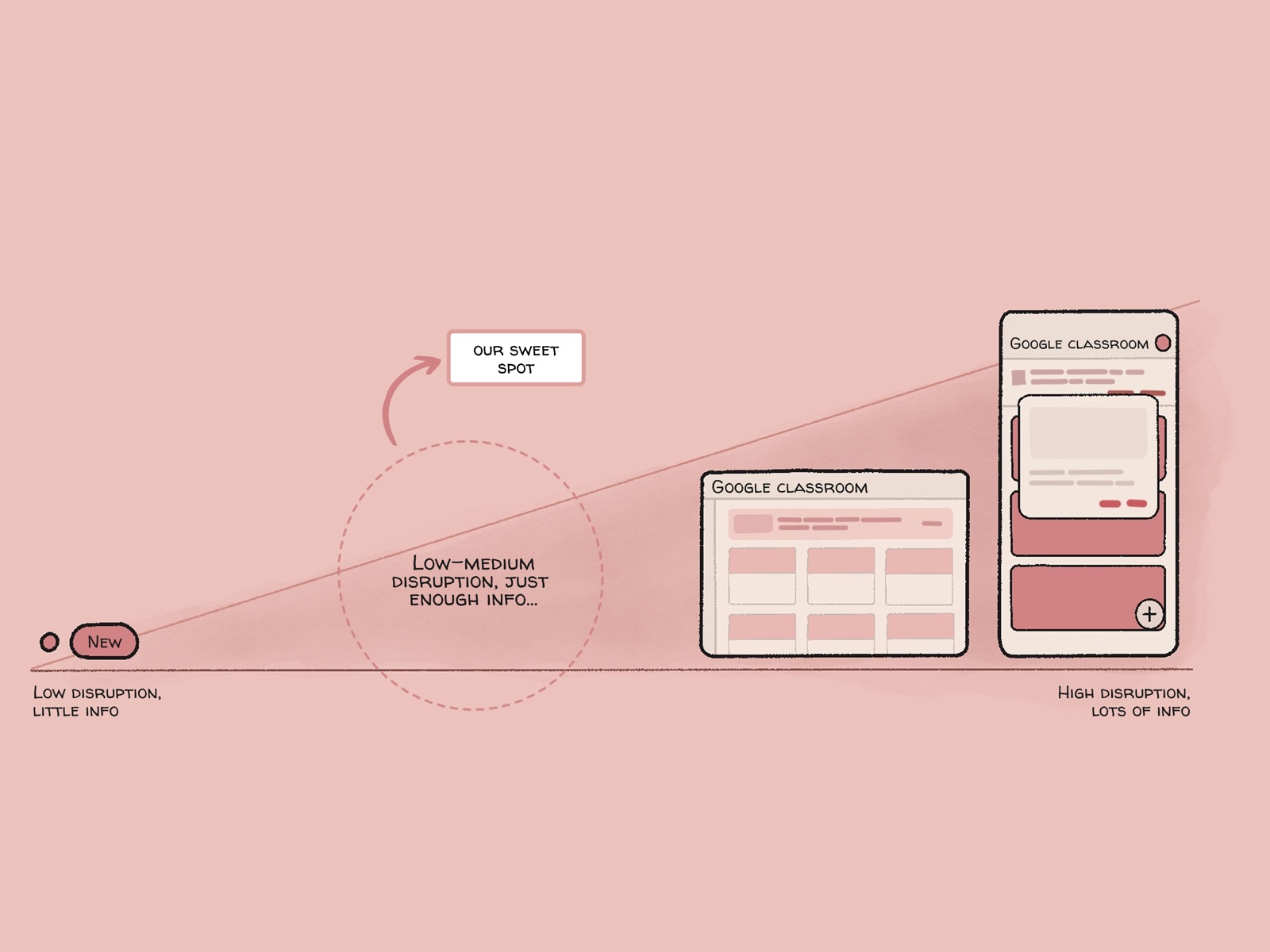
Getting buy-in meant showing the tooltip as the missing middle between two extremes.

A component only works if product teams actually use it. When we pitched to PMs and engineers, we described the problem as a gap in our user education toolkit. Our existing patterns forced teams to pick between two extremes:

  • Badges stay out of the way, but they’re too small to explain a multi-step feature or hold a button.
  • Banners and dialogs have room to explain, but they interrupt people mid-task.

Laying out this spectrum showed where the Contextual Tooltip fit. It sits in the middle and puts information right at the point of action, so users get just enough help without being interrupted.

Chart mapping disruption level against information density, from a simple notification dot to a full-screen modal

Exploration

I audited tooltips from other Google teams to see what was already working.

Before designing anything, I wanted to see how other Google teams introduced new features to their users. I audited tooltips across several Google products and compared them side by side, looking for what worked and which patterns repeated.

What other teams were already doing

A few patterns came up again and again:

  • A short title and description, usually one or two sentences.
  • An arrow pointing to the feature, so it’s clear what the tooltip explains.
  • One clear next step, like “Got it” or “Learn more,” plus a way to close it.
  • Optional extras, like an image or a step indicator for multi-part tours.
Six feature tooltips from other Google products side by side, each with a title, a short description and one or two actions

What that influenced

Starting from those patterns, I defined the tooltip’s colorways, type scale, and spacing for web and mobile. Every choice had to meet accessibility standards, and if an option failed, I threw it out, no matter how good it looked.

Visual design

Tooltip system studies

Typography, spacing, and color across web and mobile.

Selected colorways

Selected – Light Mode

#D3E3FD#1F1F1F#0B57D0

Selected – Dark Mode

#0B57D0#E3E3E3#D3E3FD
View six other colorways

Neutral

#E8F0FE#1F2937#1A73E8

High Contrast

#FAFAFA#111827#1D4ED8

Dark Mode

#1F2937#F3F4F6#60A5FA

Sky Tint

#E0F2FE#0369A1#0284C7

Deep Teal

#0E4A6E#E0F2FE#38BDF8

Midnight

#0B132B#FFFFFF#4A90E2
Typography
AaGoogle Sans

Web

Header
22px Regular
Body
16px Regular
Label
10px Medium

Mobile

Header
22px Regular
Body
14px Regular
Label
10px Medium
Spacing

Web

16px padding / 8px gap

Mobile

12px padding / 4px gap

Container paddingElement gap

Constraints & Governance

I wrote the tooltip’s documentation so every team would use it the same way.

I set rules to keep the component consistent and added limits to protect the user experience:

  • Descriptions are limited to three lines or fewer, in line with other Material 3 tooltips across Google.
  • Multi-step sequences are capped at four steps.

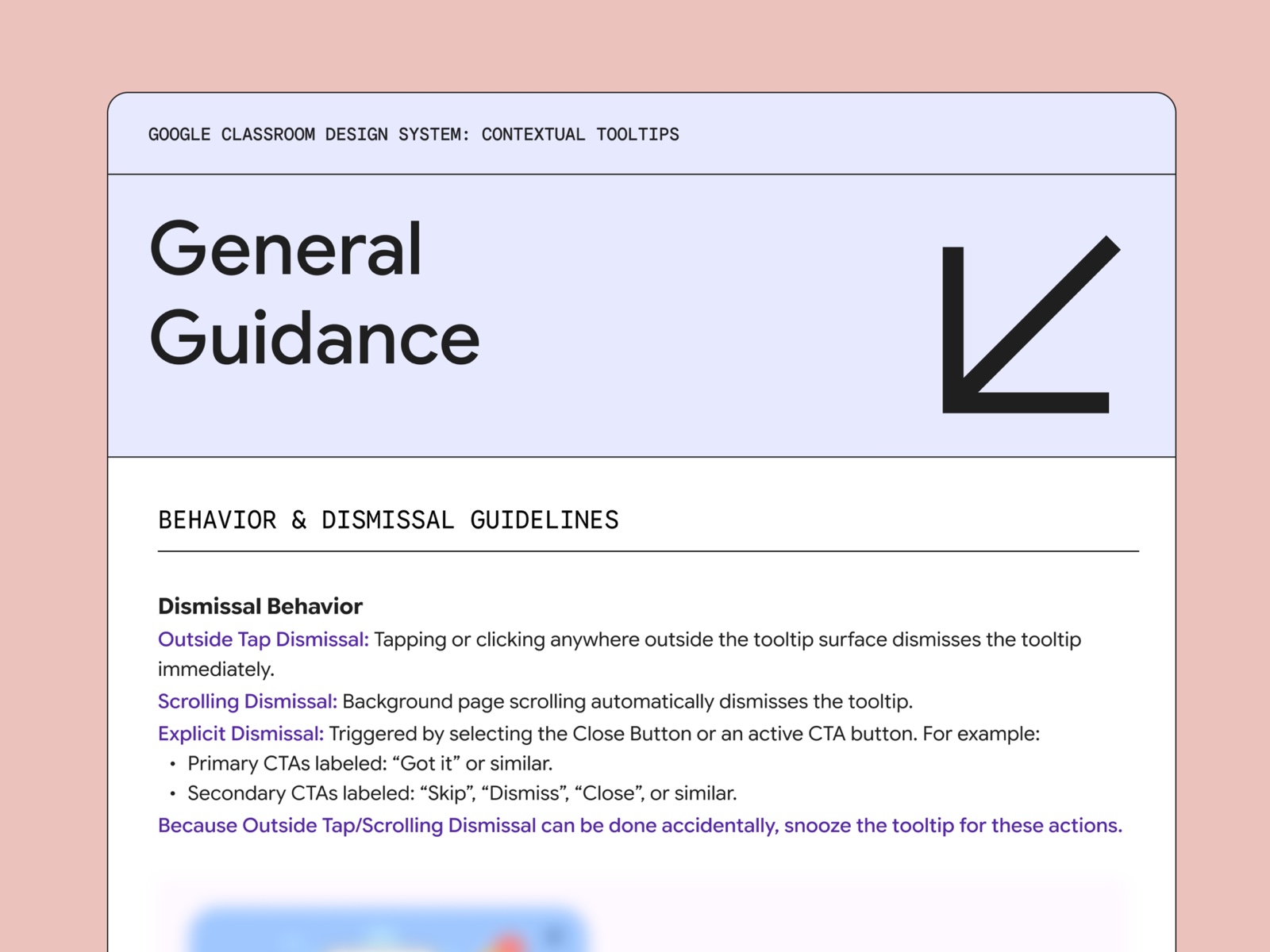
I also wanted to fix a problem from Guided Help, where people could accidentally dismiss information for good. I set up dismissal so that clicking the Close “X” or the primary call-to-action counts as an intentional dismissal. Scrolling away or tapping outside only snoozes the tooltip.

Because we presented these as system-level standards, stakeholders signed off quickly and the tooltip moved on to engineering for development.

The Contextual Tooltips page of the Google Classroom design system, open to its dismissal guidelines, with the rest blurred for NDA

Execution & Adaptability

When engineering hit a technical snag, I designed a fallback.

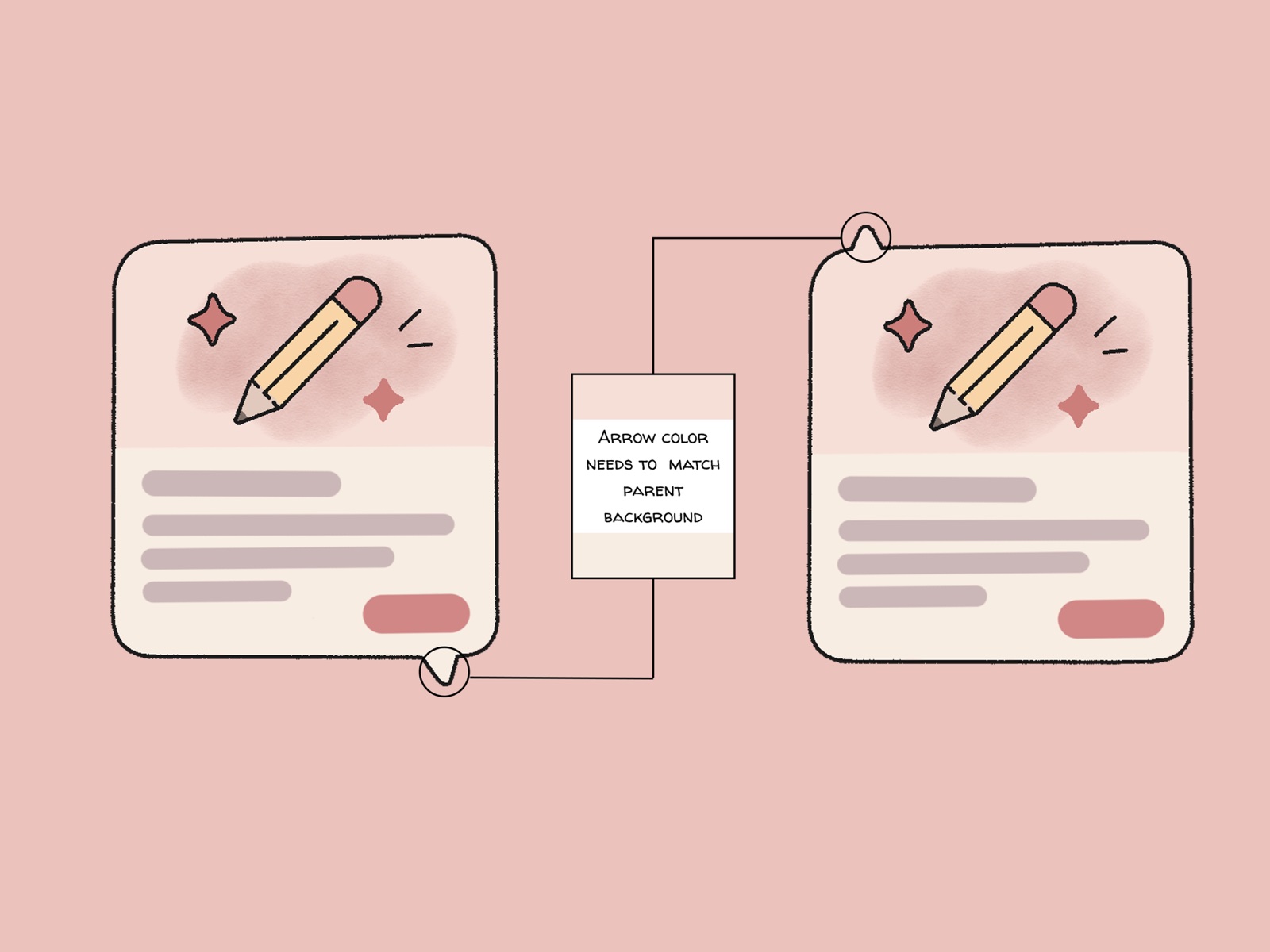
During implementation, engineering flagged the edge-to-edge media variant, where an image or video fills the top half of the tooltip. In that variant, the arrow has to change color to match the surface behind it, and engineering hadn’t scoped that logic yet.

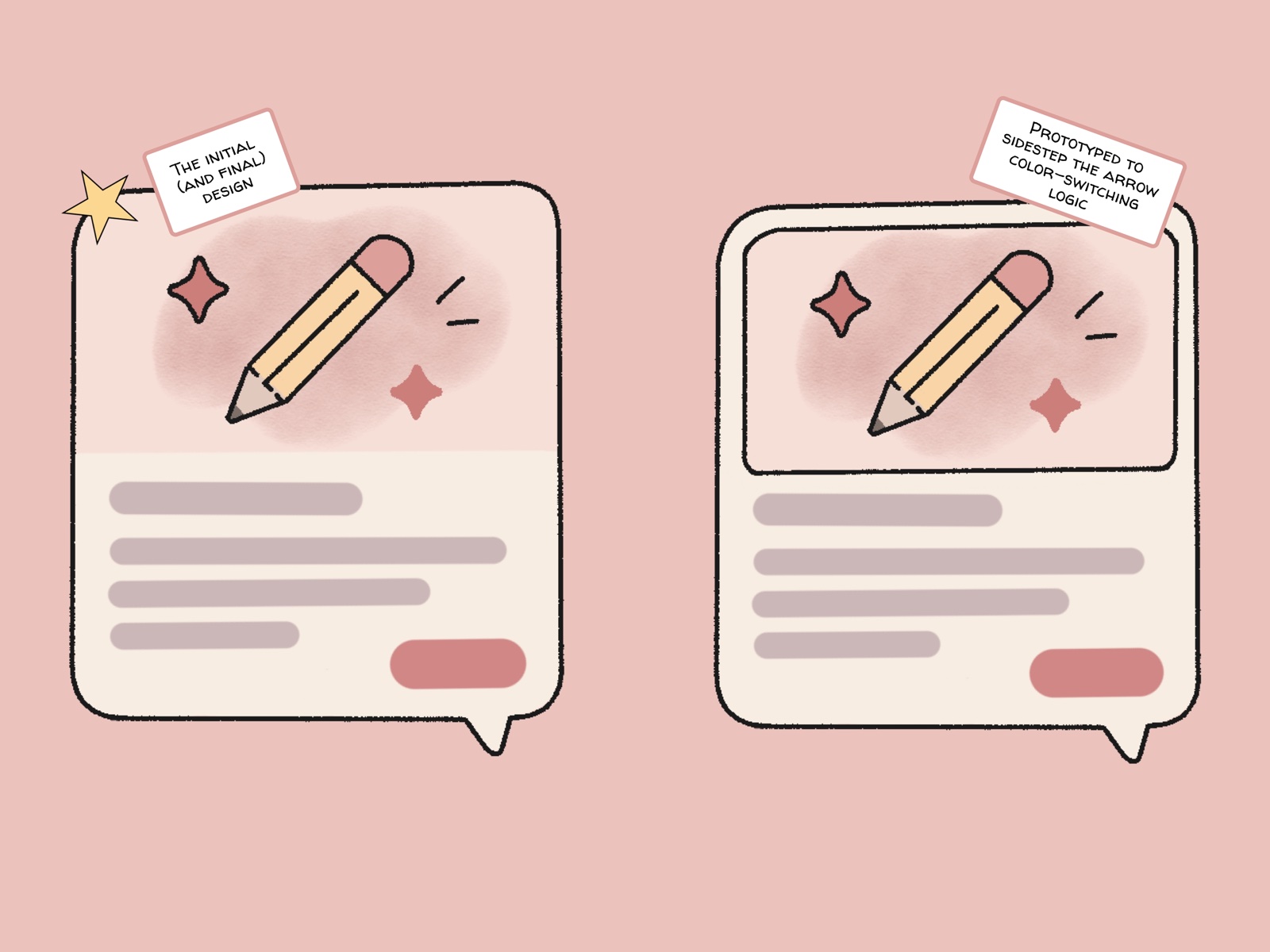
I met one-on-one with one of the lead engineers to understand what made it difficult. Then I designed a fallback variant where the media doesn’t run edge to edge, which avoids the color change entirely. That gave engineering a safe option if the arrow work took too long.

With the fallback in place, the timeline was no longer at risk, and the team went on to solve the arrow problem. I still handed off the edge-to-edge design as planned, but having the fallback kept the project moving.

Two tooltip cards, one with its arrow on top and one below, annotated: the arrow color needs to match the parent background
Two tooltip variants: the initial design with its image running edge to edge, and the fallback with the image inset, which sidesteps the arrow’s color-switching logic

Accessibility

I built GAR 4 accessibility requirements into the developer handoff.

The tool we were replacing had failed an accessibility audit, so accessibility had to be part of the design from the beginning. I worked closely with my UX mentor, an accessibility expert on the team, to build the Google Accessibility Requirements (GAR 4) into how the component behaves.

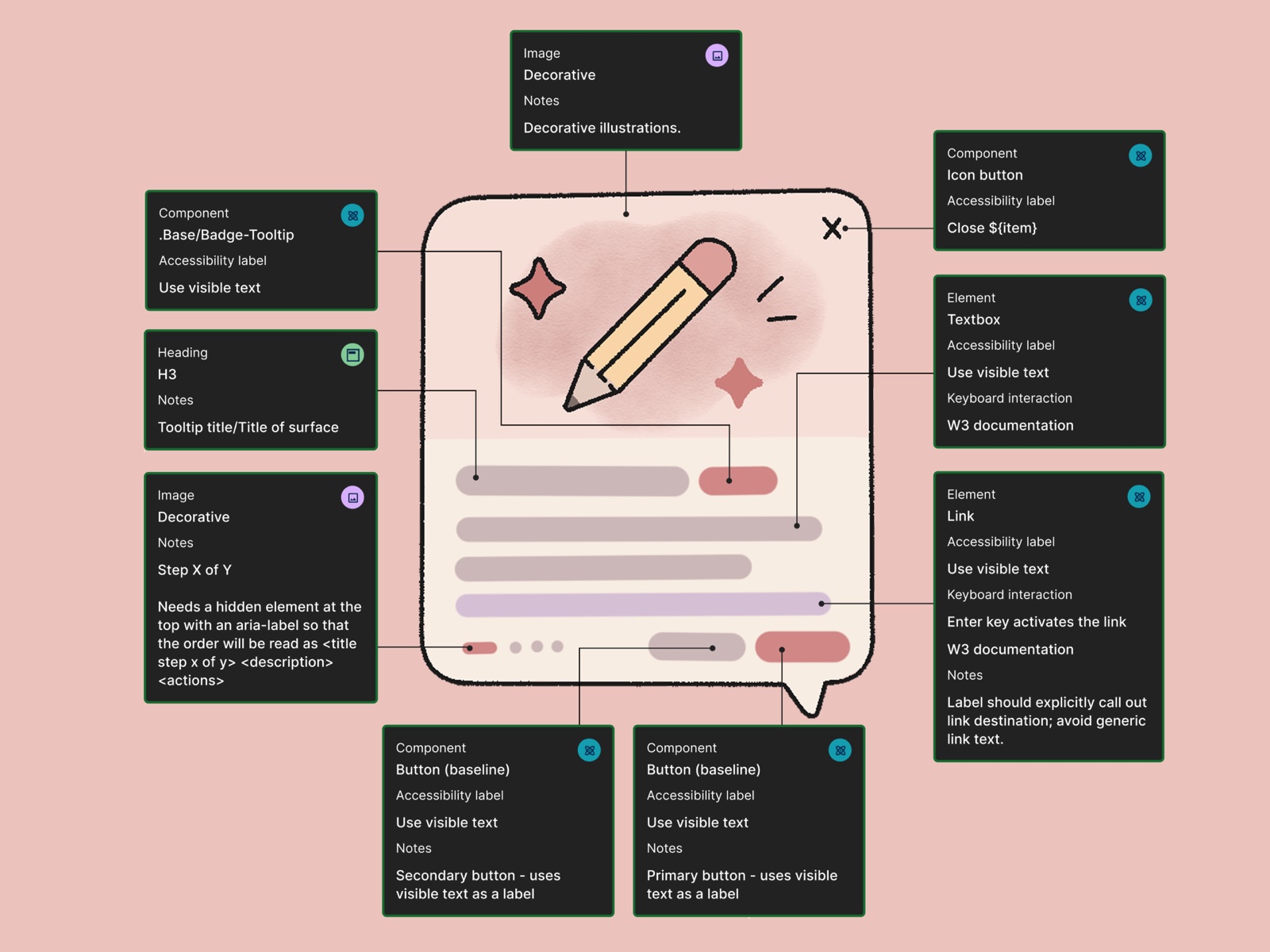
I created complete Dev Mode annotations for web and mobile. They documented focus order, screen reader labels, and keyboard interactions directly in the handoff files, so engineering had a clear reference to build from.

The tooltip annotated for engineering, labeling each part’s role, accessibility label, keyboard behavior and reading order

Outcome

This tooltip gives Classroom an accessible way to introduce new features.

  • 11+feature teams committed to adoption
  • 100%GAR 4 accessibility compliance

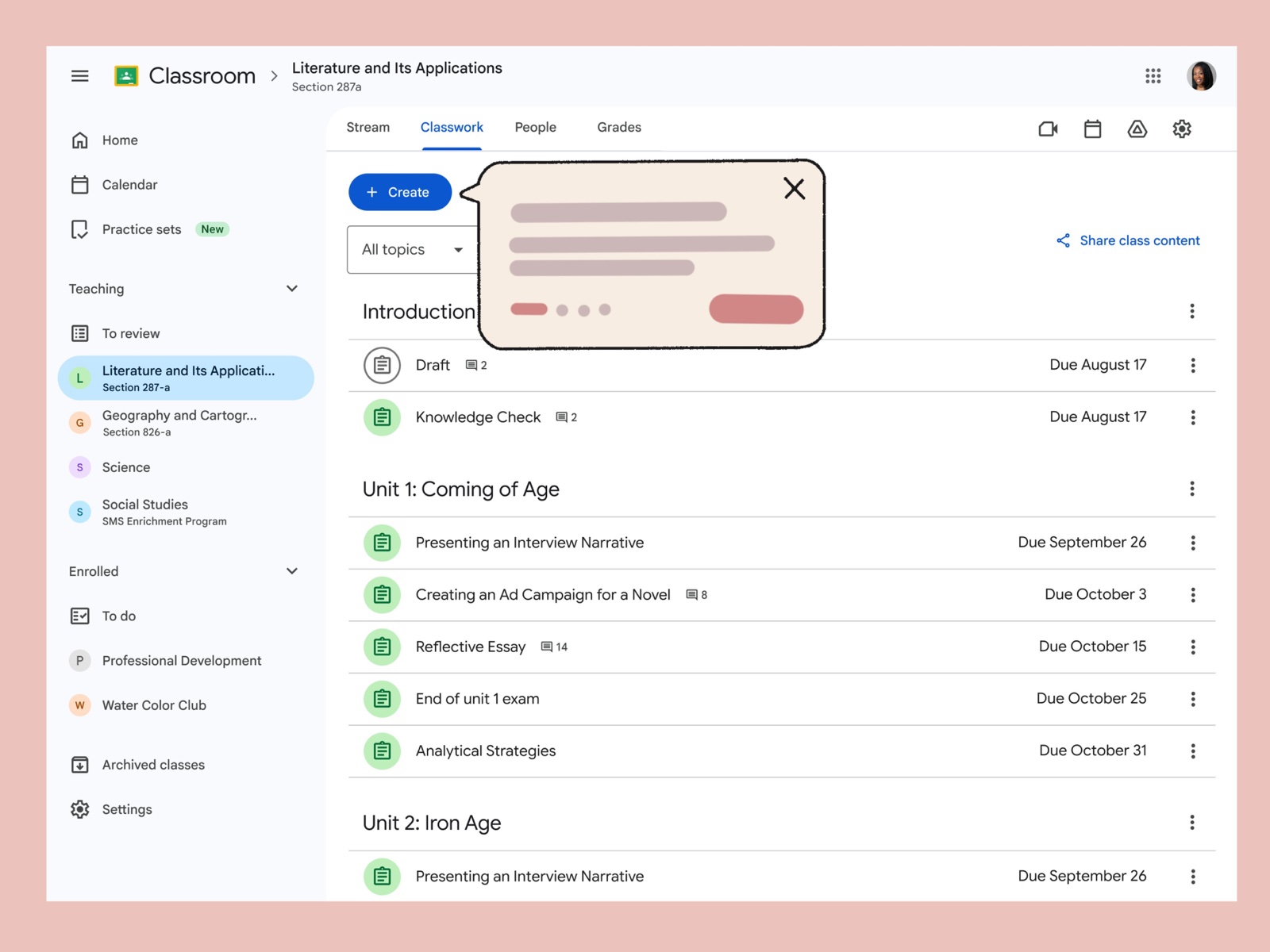
With this design, I positioned the tooltip to put guidance right at the point of action where users can discover new features. This clears the way for Classroom’s paid AI features to be found, which was the main goal of the project.

What I learned: The biggest thing I learned was how much smoother a project goes when you plan for problems early. Bringing accessibility in from the start meant we weren’t fixing issues at the end, and giving engineering a fallback meant one technical bump didn’t slow the whole team down.

What our manager said

“Thank you, Kyara, for your critical contributions to the team! You ramped up so quickly and met all of our requests like a seasoned pro… Your work kept us ahead of schedule and delivered a long-awaited key addition to our User Education library.”

Vanida V., UX Manager, Google for Education
Google Classroom’s Classwork page with the new tooltip pointing to the Create button
All work

From Ambiguity to Action.

TimelineJuly to October 2025

Fixing the Broken Troubleshooting Journey in Cloud SQL

When a critical database issue hits, users need a clear path to a fix, not a dead end. I led the redesign of the final stretch of the resolution flow in Cloud SQL, turning a disjointed journey into a guided one to build user confidence at scale.

Baseline: <1% resolution rate across 364k+ recommendations.

At a glance

Role
UX Designer
Platform
Google Cloud Platform (Web)
Team
1 PM, 1 UX Manager, 1 UX Mentor, 1 Engineering Manager, 2 Engineers
Focus
Product Design & Enterprise UX

The brief

Problem

Clicking to fix a Cloud SQL issue dropped users onto a generic configuration page with no guidance. They lost context and trust, and fewer than 1% of hundreds of thousands of alerts were resolved.

Solution

The Context Panel, a repurposed sidecar overlay that guides users to the exact setting they need while keeping the key impact details in view.

Outcome

Cross-functional stakeholders approved it as a low-cost, high-value solution. A broader organizational re-org paused the rollout, but the framework set a standard for closing the troubleshooting loop.

01 Problem

When a fix creates more confusion than the original alert, users stop trying.

  • 364,000+database recommendations generated in Q3 2024
  • 21,800database recommendations viewed
  • <1%resulted in user action or clicks

Imagine your computer warns you that your disk is almost full. You click the notification for help, expecting to see which large files to clear. Instead, it opens your entire system settings, and you have to hunt through dozens of menus from memory to find the problem you came to fix.

Cloud SQL users faced something similar. When a database was flagged with a critical issue, trying to fix it dropped them onto a broad, generic configuration page. Their original context didn’t follow them, so they had to search for a fix with no direct help. Faced with that, database administrators (DBAs) consistently chose to do nothing over risking an unverified change to a live environment.

In Q3 2024, Cloud SQL generated over 364,000 database recommendations, and fewer than 1% led to user action. The legacy troubleshooting flow was a dead end, so I was tasked with redesigning the final stretch of the resolution flow to rebuild user trust and make resolving issues practical.

The before — What do I even do here?

02 Discovery & Trust

I wanted to understand why users were ignoring critical alerts.

To understand the problem quickly without running new external studies, I interviewed 8 internal subject matter experts (SMEs). They included the UX researchers (UXRs) who first investigated this space, as well as stakeholders outside UX.

Pulling their insights together showed a serious lack of trust. DBAs ignored the recommendations because the UI didn’t show what a fix would affect. As one user put it:

“My application has 100 active users, but if I enable this [fix], then it will shut down. What about these 100 users?”

Lead Cloud Architect, Anonymous

It became clear that to get users to act, the design had to show the consequences, like downtime and cost, before they committed to a fix.

03 Strategy

Weighing technical trade-offs helped us find the most user value for the least engineering cost.

I explored four concepts to solve the context loss, ranging from a lightweight “Context Card” to a highly complex “Integrated Subtask.”

Concept 1: The Context Card

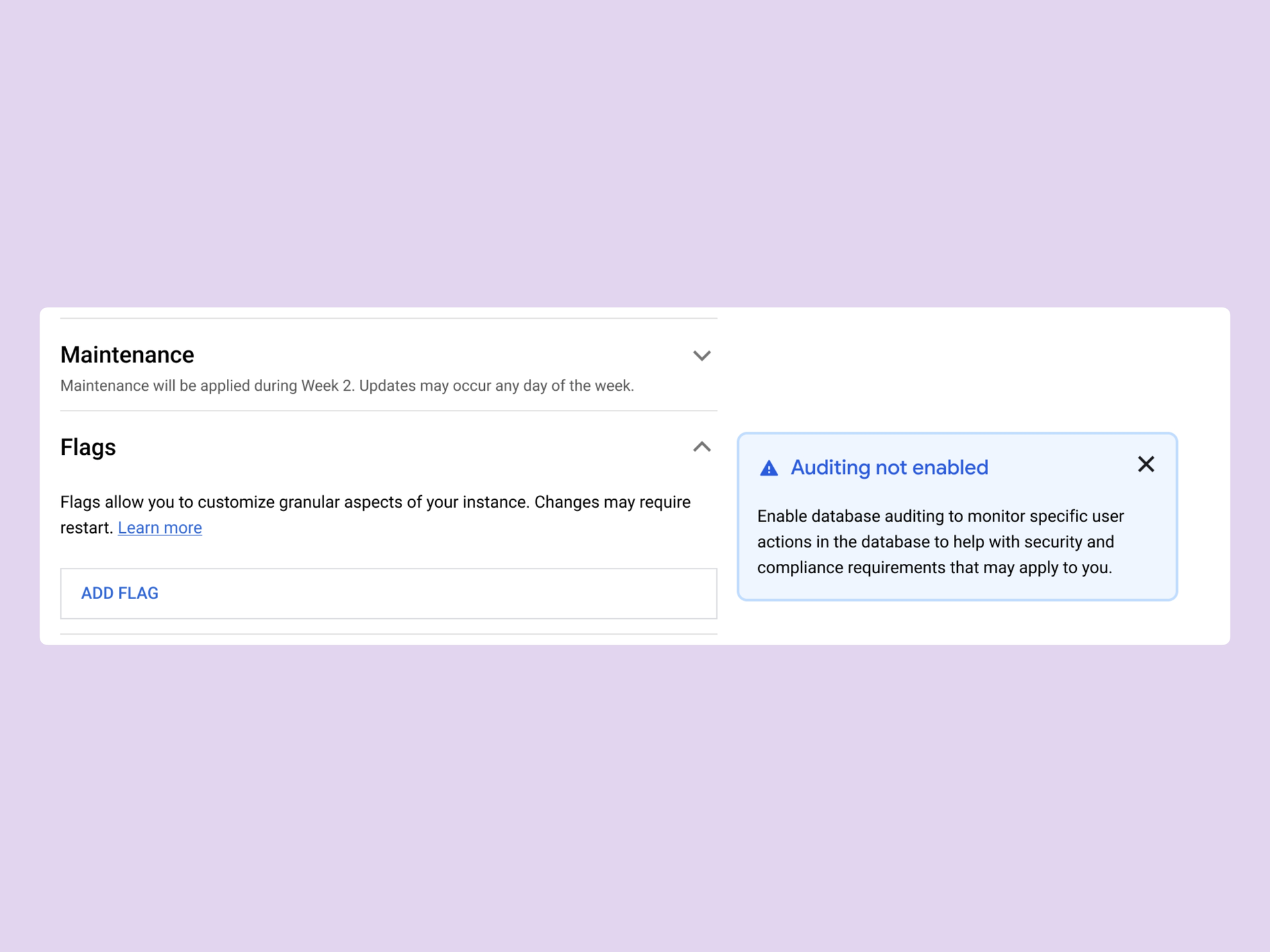
A persistent card that kept issue details visible while auto-scrolling to the relevant setting. It was a strong start for maintaining context, but too lightweight for high-stakes database tasks.

Concept 1, the Context Card: the Auditing not enabled issue kept in a card beside the Flags setting it points to

Concept 2: The Integrated Subtask

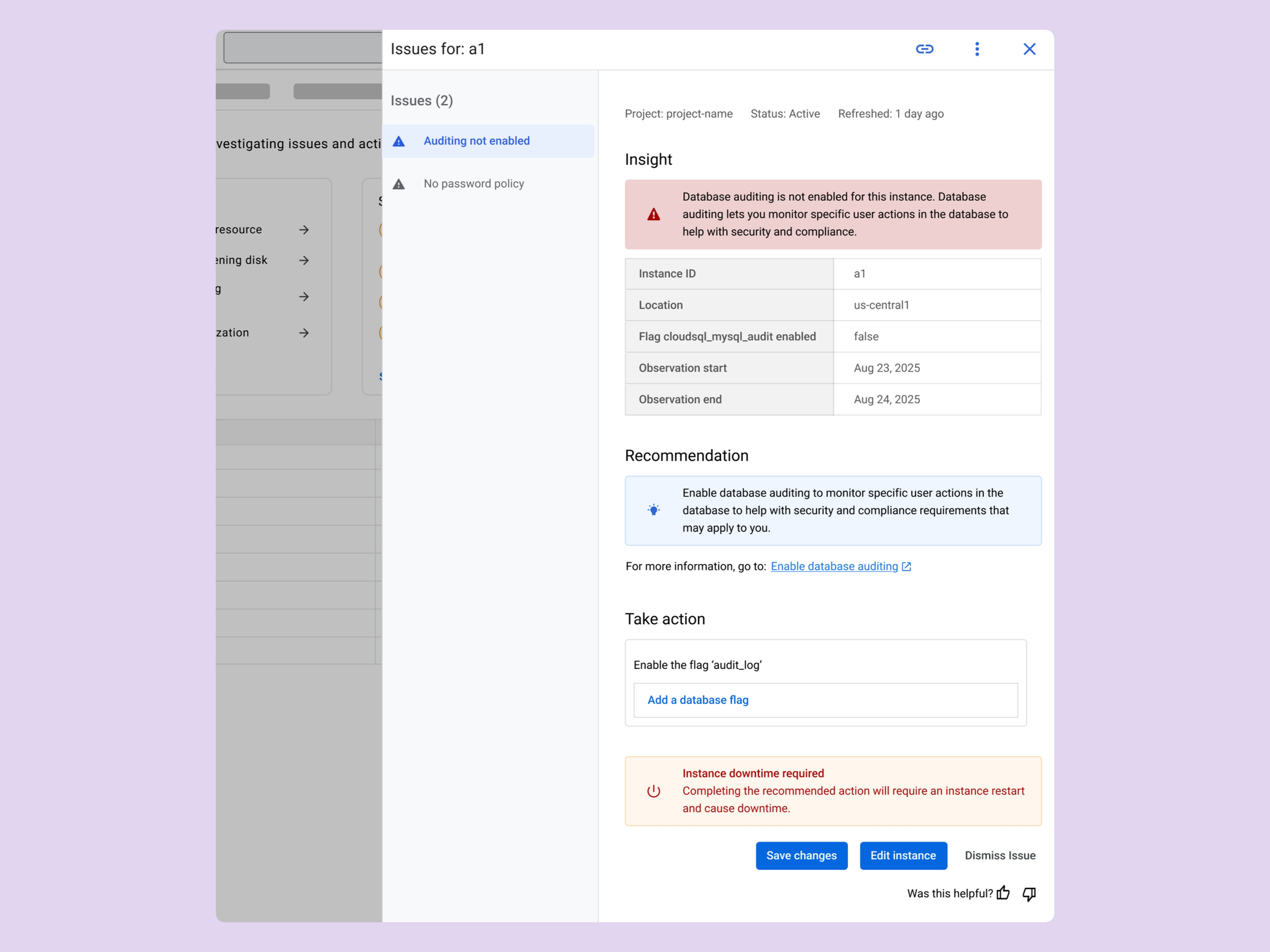
This involved resolution components embedded directly in the subtask view for an all-in-one workflow. It was intuitive, but the UI was complex and would have taken significant engineering effort.

Concept 2, the Integrated Subtask: an issue panel with its insight, recommendation and a Take action field to add the database flag

Concept 3: The Issues Tab

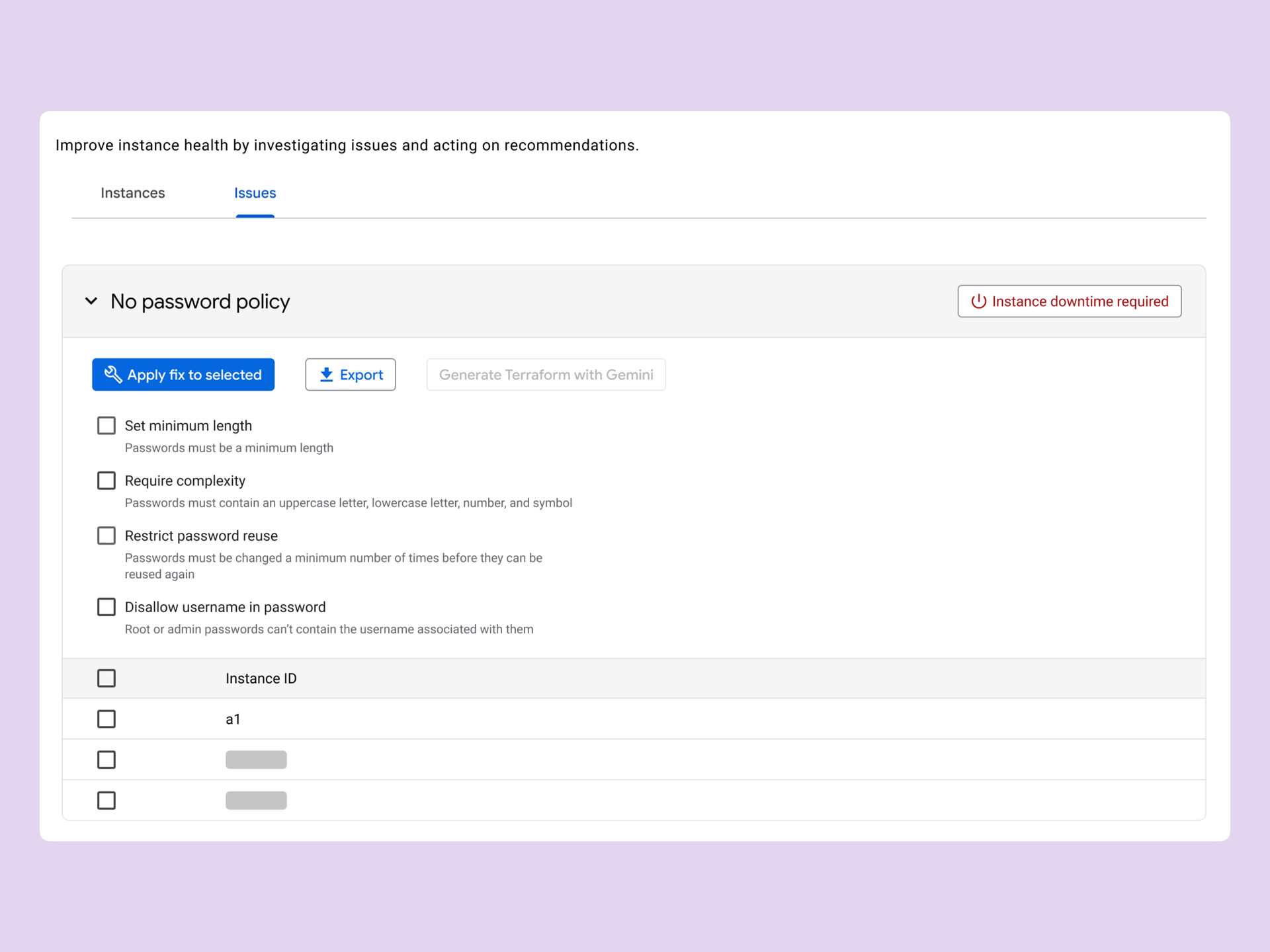
A forward-looking vision for managing alerts at scale through bulk resolution. It was highly efficient for large fleets, but it didn’t solve the immediate, single-instance troubleshooting path.

Concept 3, the Issues Tab: instances grouped under No password policy, with Apply fix to selected

Concept 4: The Recommendations Hub

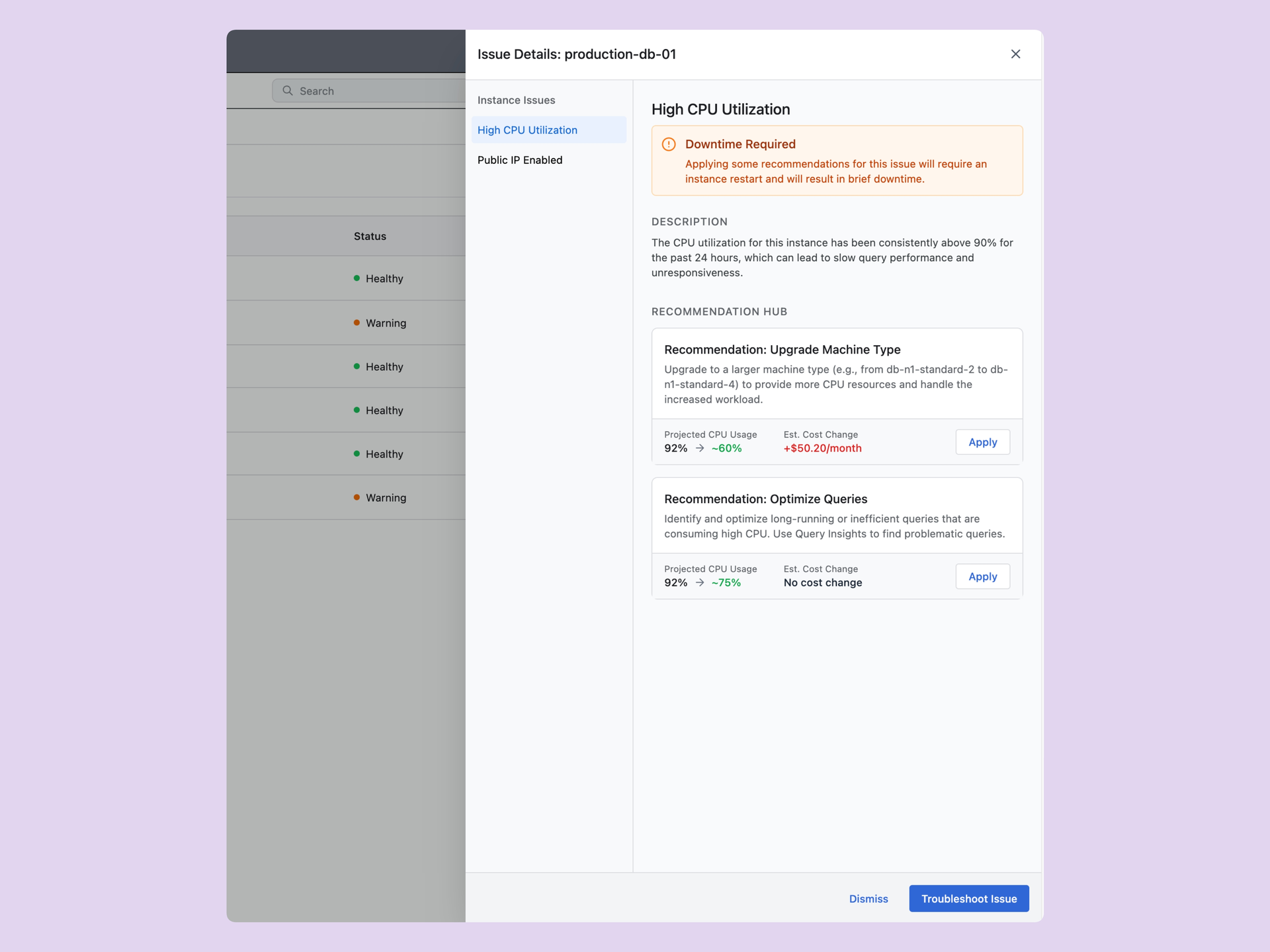
A central surface for comparing multiple resolution options and their trade-offs side by side, so users could pick the fix that suited them best.

Concept 4, the Recommendations Hub: two fixes for high CPU compared side by side, each with projected usage, cost change and Apply

The wall

In a cross-functional review with UX and Engineering, we hit a technical wall. Our preferred concept, the Integrated Subtask, required building a new component, and we didn’t have the resources to do that at the time.

Final pick

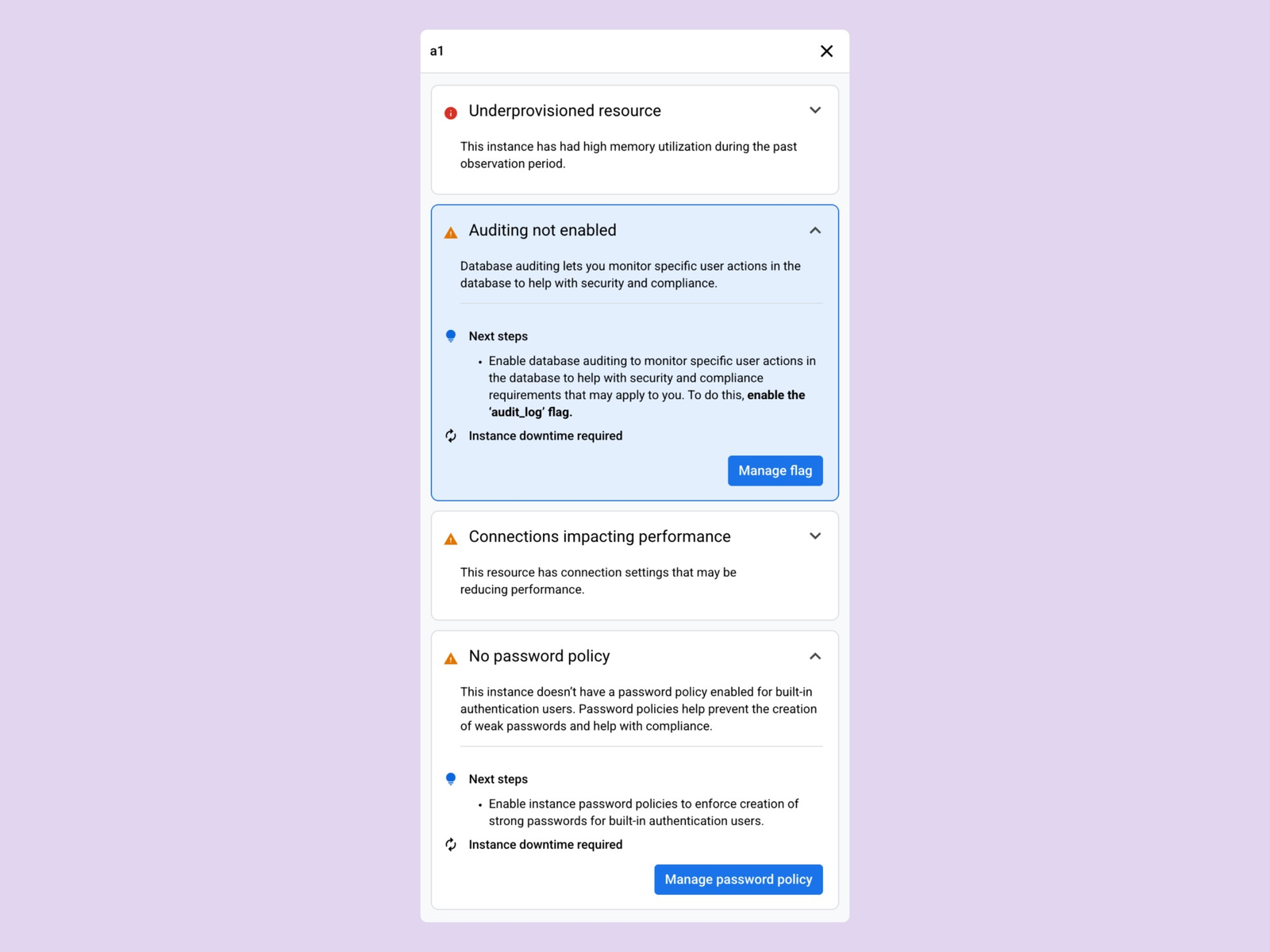
To bridge the gap, I designed a hybrid “Goldilocks” solution. I took the context-preserving mechanics of the Context Card and combined them with an existing panel component already built for Database Center. The result was the Context Panel. It gave users the context they needed and removed the cost of building a new component from scratch.

Concept 1, the Context Card: the Auditing not enabled issue kept in a card beside the Flags setting it points to

Context Card mechanics

plus
The existing Database Center side panel, listing a resource’s issues as expandable cards with next steps

Existing Database Center panel

equals
The Context Panel: an instance’s issues as expandable cards, each with next steps, a downtime note and a button to its setting

The Context Panel

04 Final Flow

I guided users to the right setting but left the change in their hands.

The Context Panel brings the issue and its resolution into one view. It auto-scrolls the user straight to the relevant setting on the configuration page.

In high-stakes enterprise database environments, filling in configuration changes automatically created too much risk of users applying a fix without fully understanding it. So the panel scrolls to the exact spot but still requires users to make the change themselves. That closes the navigation gap and keeps the action intentional and verified.

Below is the final design and the user journey it supports:

  1. Investigate issue
  2. Click CTA
  3. Solve primary issue
  4. Fix additional issues
  5. Save changes

05 Outcome & Reflection

I closed the troubleshooting loop and found the next opportunity at fleet scale.

  • Approvedby cross-functional stakeholders
  • Fleet scaleidentified as the next opportunity

The Context Panel turns a dead-end journey into a guided workflow. It’s designed to keep critical issue details visible throughout the fix, so DBAs don’t have to rely on memory, and it positions Cloud SQL to improve on its resolution rate of under 1%.

Shortly after the team aligned, a Google Databases-wide re-org shifted priorities and paused engineering work. The project still left a lasting impact. It gave the team a low-cost blueprint for single-instance troubleshooting, and it reinforced a UXR insight that DBAs need bulk resolution tools at the fleet level. The Context Panel solved the immediate navigation problem, and it set up the next step in managing database issues at scale.

All work

Charting the Migration.

TimelineJuly 2025

I helped settle a design debate over a migration flow through usability testing with six enterprise customers. Our comparison of the two approaches led the Google Compute Engine team to adopt a database-first recommendation.

6 participants. 2 approaches. 1 adopted recommendation.

Estimated revenue opportunity: $8.32M.

At a glance

Role
UX Research Collaborator
Platform
Google Compute Engine (Web)
Team
1 Senior UXR, 1 UX Designer, 3 PMs, 4 Engineers
Focus
UX Research & Enterprise UX

The brief

Problem

Moving complex Oracle workloads to Google Compute Engine (GCE) meant going through an intimidating configuration flow. The team was split between two approaches and risked shipping an experience that didn’t match how infrastructure teams actually work.

Solution

A dual-track usability study using the RITE (Rapid Iterative Testing and Evaluation) method and live AI Studio prototypes. It settled the debate and validated the key features that were missing.

Outcome

The product team adopted the recommendation as the baseline, and we got it onto the roadmap right away. That cleared the way for an estimated $8.32M migration pipeline. Read the official blog post.

01 Context

When internal teams are split, guessing at the right UX can stall millions in enterprise migrations.

Migrating an enterprise Oracle database to Google Cloud means configuring dozens of variables across compute, storage, networking, and licensing. It’s a notoriously stressful process for the database administrators (DBAs) and infrastructure architects who manage it.

I was brought in to help run a rapid usability evaluation that would settle the debate based on what users actually preferred. The result affected a PM-projected $8.32M pipeline tied to the Oracle partnership.

At the center of the debate were two provisioning flows that Google Compute Engine (GCE) had drafted to ease the transition. The team was split down the middle:

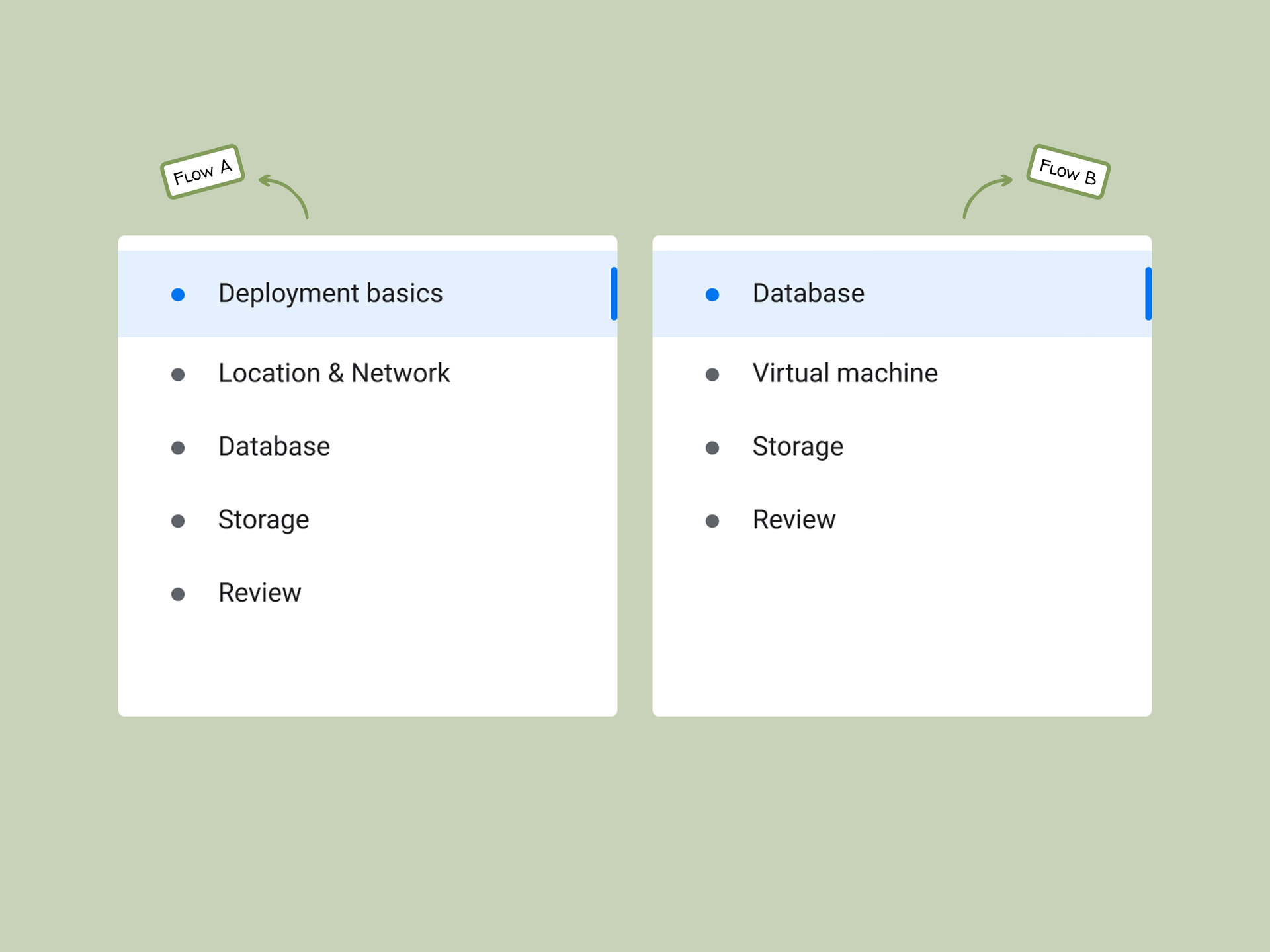
Flow A

Organized by infrastructure components first (networking, regions, VMs).

Flow B

Organized by database configuration first (edition, sizing, workload context).

Flow A and Flow B navigation side by side, Flow A opening on deployment basics and Flow B opening on the database

02 Methodology

We tested database provisioning on two tracks to break down its complexity.

  • 6Google Cloud
    customers
  • 60 minremote sessions
  • 2parallel testing tracks

We ran 60-minute remote usability sessions with six current Google Cloud customers who had decision-making power over their organizations’ database architectures.

Our senior researcher led the interviews, and I owned the operational side. I recorded the raw data, co-built the rapid prototype changes in AI Studio, and synthesized the findings into the final technical report and presentation.

We split the testing into two tracks so we could settle the layout debate and still iterate on design feedback as it came in:

Evaluative testing

Participants stress-tested static Figma concepts for both Flow A and Flow B.

  1. Figma concepts of Flow A and Flow B
  2. Participants stress-test both
  3. Settles the layout debate

Rapid Iterative Testing (RITE)

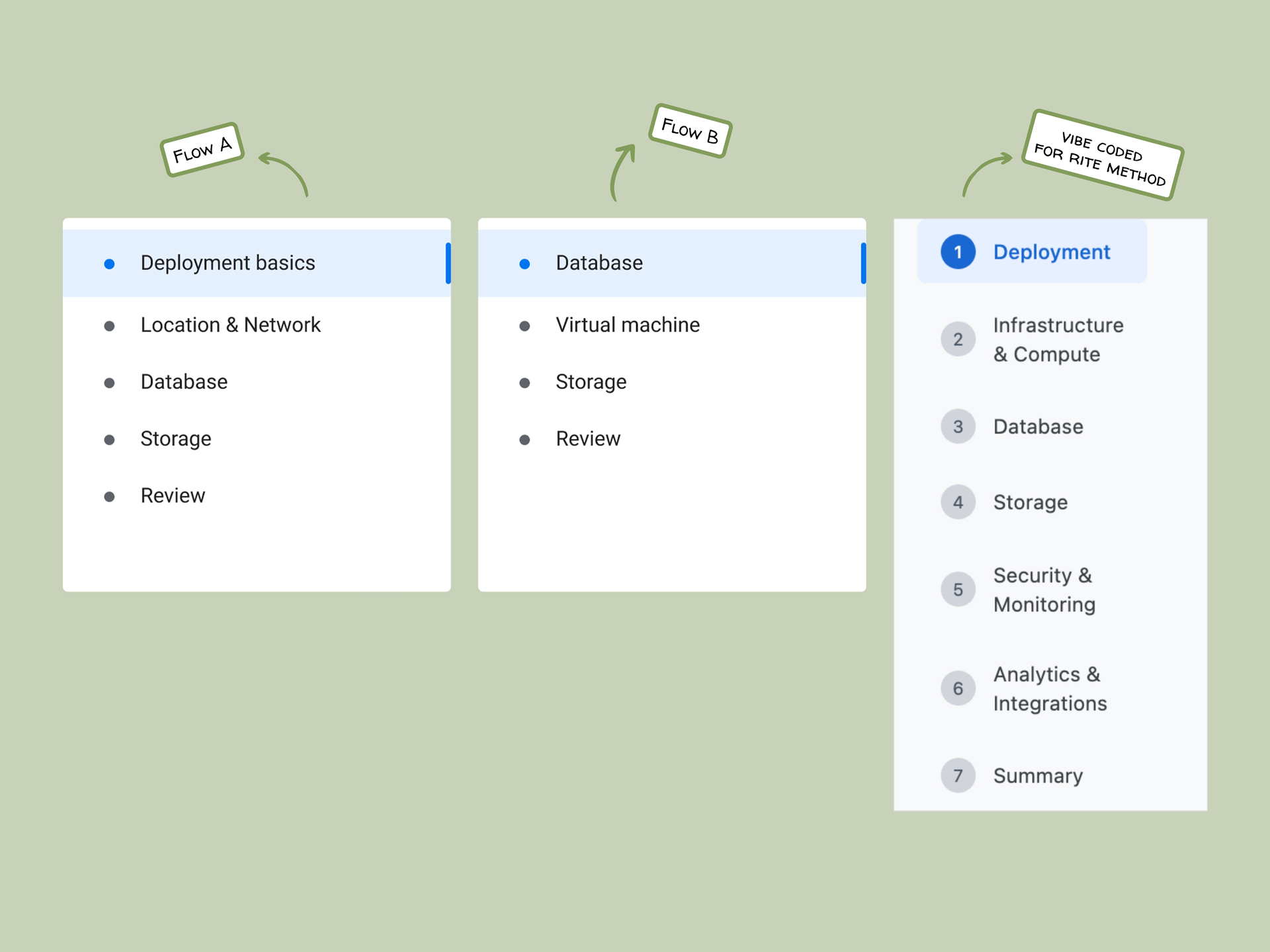
To go beyond picking A or B, we used AI Studio to build flexible, “vibe-coded” prototypes. By prompting it, we generated hi-fi changes on the fly and updated the UI both during and between sessions. That let us test feedback in near real time and ask users directly, “Is this what you meant?”

  1. Feedback in session
  2. Prompt AI Studio
  3. Updated hi-fi UI
  4. “Is this what you meant?”

03 Discovery & Alignment

We settled the structure by looking at how users think about deployment.

Testing showed that user preference came down to their mental models of physical deployment. Flow A split opinion because it made users configure networking and regions before defining the database itself, which reversed the order they naturally follow when setting something up.

Why Flow B won

Flow B matched how infrastructure teams actually think. Expert users needed to establish the database edition, sizing, and workload context before touching the underlying virtual machines. Setting the overall database scale first gave them the context to pick machine families and storage accurately later.

Solving section fatigue

Both static flows overwhelmed users once a section passed eight configuration fields. Using our live prototypes, we showed that progressive disclosure was the fix. A multi-page setup capped at 5 to 6 logical groupings per page cut out endless scrolling and kept users focused on the task in front of them.

Three setup navigations side by side: Flow A from deployment basics, Flow B from the database, and the vibe-coded RITE flow in seven numbered steps

04 Strategy

Live prototyping surfaced two features the flows were missing.

The RITE testing data helped us identify and validate improvements for the immediate roadmap. By updating the AI Studio prototype on the fly, we surfaced and validated two key features:

Real-time cost transparency

Users felt blind to cost, and it was their top complaint. We tested a live estimator panel that updated instantly with every selection, so users could see the financial impact of their setup right away.

“T-shirt sized” deployment templates

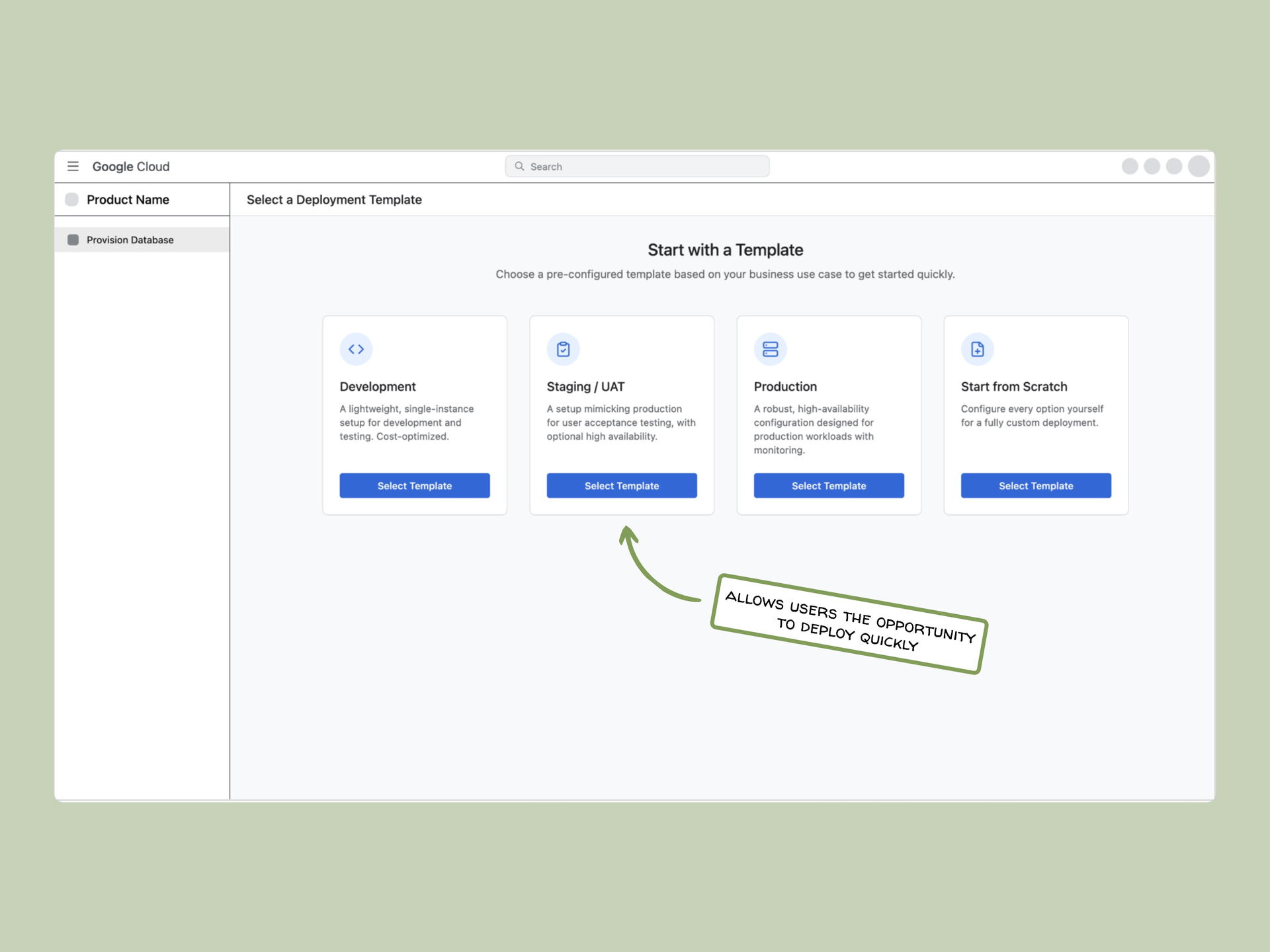
Starting from a blank canvas made users hesitate on non-production builds. We tested pre-configured Dev, Staging, and Production templates that let users launch a basic setup in a few clicks while keeping full control of the configuration.

A Start with a Template page offering Development, Staging/UAT, Production or Start from Scratch, annotated: allows users to deploy quickly

05 Outcome & Reflection

Fast research turned into a product decision.

  • Flow Bunanimously adopted as the product baseline
  • $8.32Mprojected migration pipeline unblocked
  • 2features carried onto the roadmap

Our evaluative findings gave the GCE team the user data it needed to finalize Flow B as the product baseline and break the internal tie.

This project showed me how much real-time iteration is worth. I tweaked the AI Studio prototypes between and during sessions, so we could check user input right away and didn’t have to guess what might work. That gave us confidence that our final recommendations matched what enterprise users needed. The features we validated through the vibe-coded prototypes were also added to the roadmap for future iterations.

What my research collaborator said

“Thanks for your great work with the Oracle on GCE usability study. I was really impressed with the way you were able to jump right in on a novel and complex topic and your willingness to just go for it. I expected to get some assistance with note taking and basic analysis. Instead, you were able to take over the entire synthesis and write up of findings with very little input from me. And then you went ahead and made a really beautiful, well organized deck for the read-out, even though you didn’t have to. Thanks for making me look so good in front of stakeholders! :)”

Chantrelle J., Senior UX Researcher, Google Cloud Platform